The Practical ASO Keywords Guide We Hand to New Clients
Most apps rank for the wrong words, or for nothing at all. This is the ASO keywords method we hand to every new client: how to find the terms real people type, pick the ones you can win, and place them where the stores actually read them.
Key takeaways
- ASO keywords are chosen on relevance first, winnability second and volume third. A popular word your page cannot convert on is wasted space.
- On iOS, the app name, subtitle and 100-character keyword field are what the search algorithm reads. Never repeat a word across them and never waste characters on spaces or plurals you already have.
- On Google Play, the full description is searchable, so write it for people and place your priority phrases naturally a handful of times, not dozens.
- Competitor gap analysis finds the mid-tail terms big apps ignore, and those are where a smaller app climbs fastest.
- Treat keywords as a monthly loop: track rankings, compare against store page conversion, swap the losers and keep a written log of every change.
01What ASO keywords really are and why most apps choose them badly
ASO keywords are the search terms you deliberately target so your app appears when people search inside the App Store or Google Play. Store search is still where a large share of intentional installs begin, and the people who find you there tend to know roughly what they want. That makes them some of the best users an app can get, which is why we start almost every app store optimisation engagement with the keyword set.
The trouble is that most teams pick keywords the way they would name a product. They brainstorm in a meeting, choose words that describe how they see the app, and paste them into the store console. Six months later the app ranks well for its own brand name and almost nothing else. We have opened keyword fields on new client accounts that contained the company tagline, competitor names the app had no chance of ranking for, and the same word written three different ways.
This guide is narrow on purpose. If you want the full discipline of store pages, screenshots, ratings and experiments, read our practical app store optimisation guide first. Here we stay with one job: choosing the right words and putting them in the right places.
02Relevance, volume and difficulty: how we score ASO keywords
Every keyword tool gives you two numbers, some version of popularity and some version of difficulty. Both are estimates. Apple and Google do not publish exact search volumes, so every third-party figure is modelled. We still use them, but we treat them as a way to rank options against each other, not as truth.
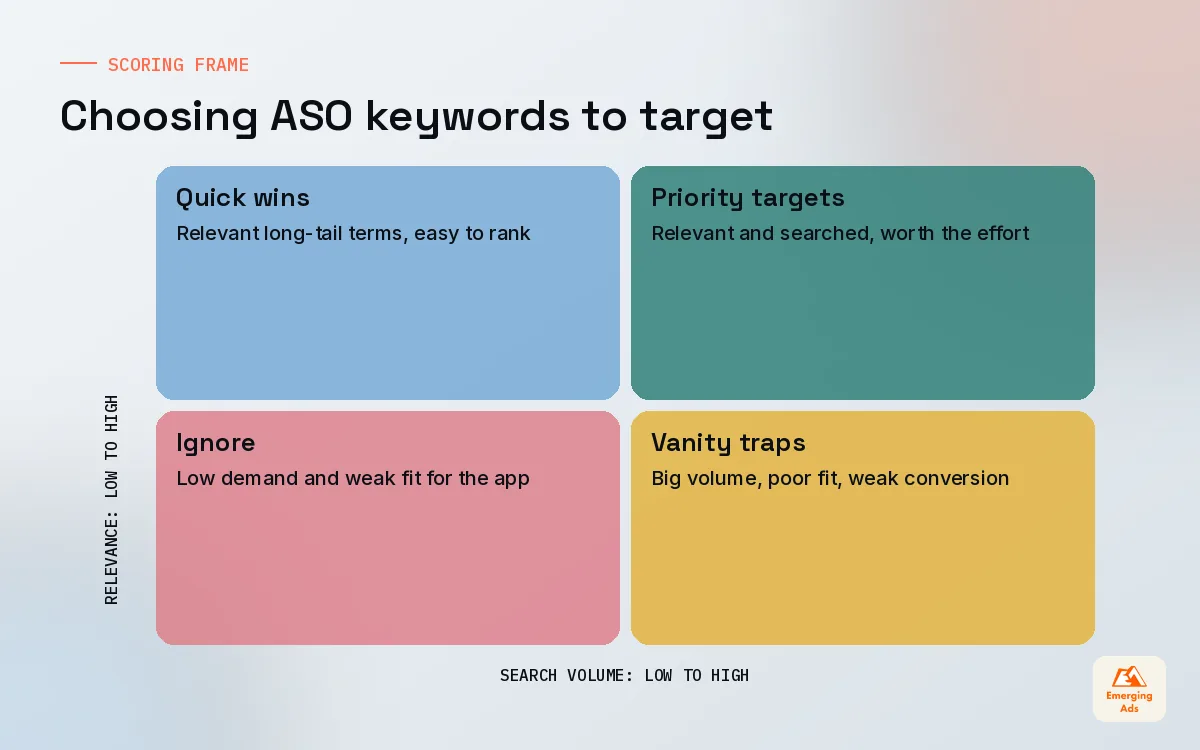
The number that matters most is one no tool can give you: relevance. A keyword is relevant when someone who types it and lands on your store page would think, yes, this is what I was looking for. Rank for an irrelevant term and the store notices. Impressions rise, taps and installs do not, and the conversion gap tells the algorithm you are a poor answer for that query.
Our three-question filter
- Would a happy user describe the app this way? If not, drop it, however tempting the volume.
- Can we reach the top ten within 90 days? Check who ranks there now. If every slot belongs to apps with hundreds of thousands of ratings, park it for later.
- Is there enough search to matter? Only now do we look at popularity. A relevant, winnable term with modest volume beats a famous term you will sit at position 60 for.
We score each candidate from 1 to 5 on those three questions and multiply relevance by two. That weighting is deliberate. It stops the team chasing big head terms and pushes the list toward phrases that actually convert.
| Keyword type | Example (fitness app) | Volume | Difficulty | Our usual role for it |
|---|---|---|---|---|
| Head term | workout | High | Very high | Long-term target, rarely early focus |
| Mid-tail | home workout plan | Medium | Medium | Core of the first keyword set |
| Long-tail | workout plan for beginners at home | Low | Low | Quick wins, builds relevance signals |
| Problem term | lose belly fat | Medium | Medium to high | Good if the store page speaks to it |
| Competitor brand | another app’s name | Varies | High | Usually avoid, often low conversion |
Volume and difficulty labels in the table are illustrative, based on patterns we see across accounts, not figures from either store.
03Our ASO keyword research method, step by step
Good ASO keyword research is mostly listening. The best terms rarely come from the product team. They come from customers, reviews and the search bar itself.
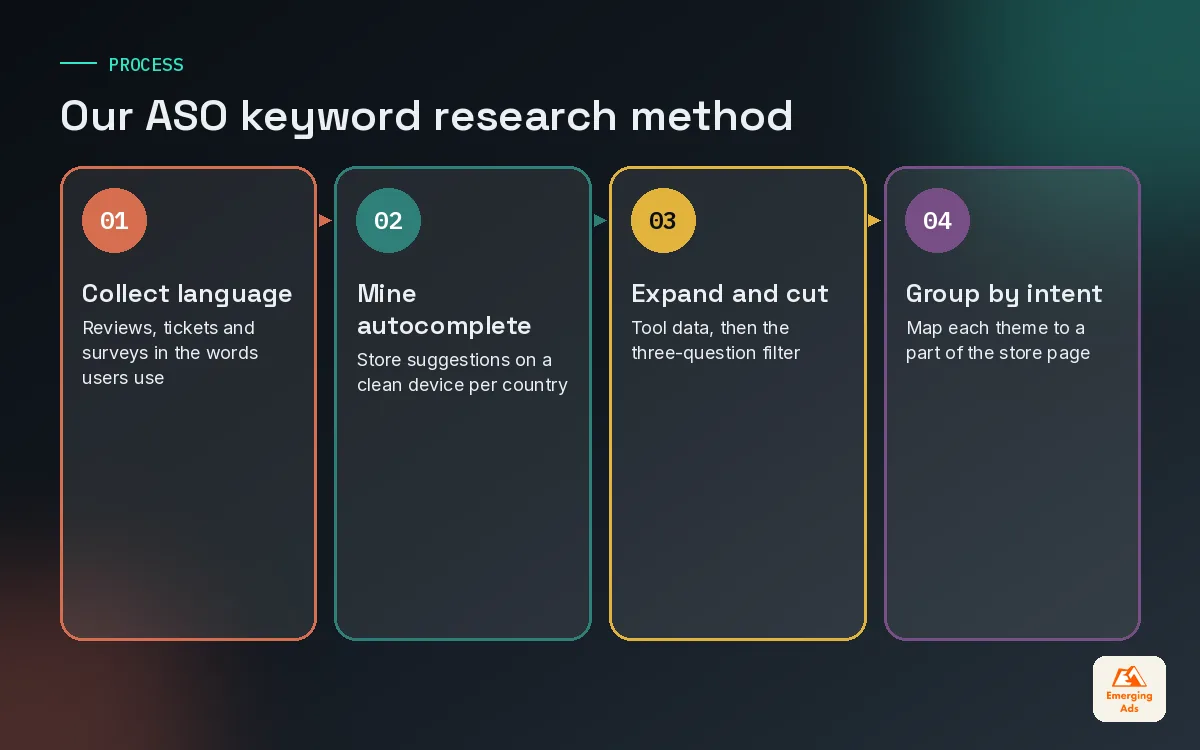
1. Collect the language users already use
Read your own reviews and your competitors’ reviews, especially the three and four star ones where people explain what they wanted. Pull support tickets and onboarding survey answers. Write down every phrase that describes the problem in plain words. On one budgeting app we work with, users kept saying “track my spending” while the team had been targeting “expense manager”. The first phrase became the subtitle and moved more installs than any other change that quarter.
2. Mine the store's own suggestions
Type each seed phrase into both stores and note the autocomplete suggestions. They reflect what people actually search, and they change by country. We do this on a clean device so personal history does not skew the list.
3. Expand with tools, then cut hard
Run the seeds through an ASO tool to find related terms and estimates. Web search data helps too: our keyword research team often spots problem phrases on Google that later show up in store search. A typical first pull gives us 300 to 500 candidates. After the three-question filter we keep 40 to 60.
4. Group by intent
Cluster the survivors into themes: the core function, specific features, audiences and problems. Each theme should map to something on your store page. If you target “budget for couples” but no screenshot mentions couples, your conversion on that term will be weak.
04Using the 100-character keyword field on iOS
On the App Store, the search algorithm reads three text fields: the app name (up to 30 characters), the subtitle (up to 30) and the keyword field (up to 100 characters, never shown to users). Apple does not use your description for search. That gives you about 160 characters to describe your whole keyword strategy, so every one counts.
Rules we follow on every iOS keyword field
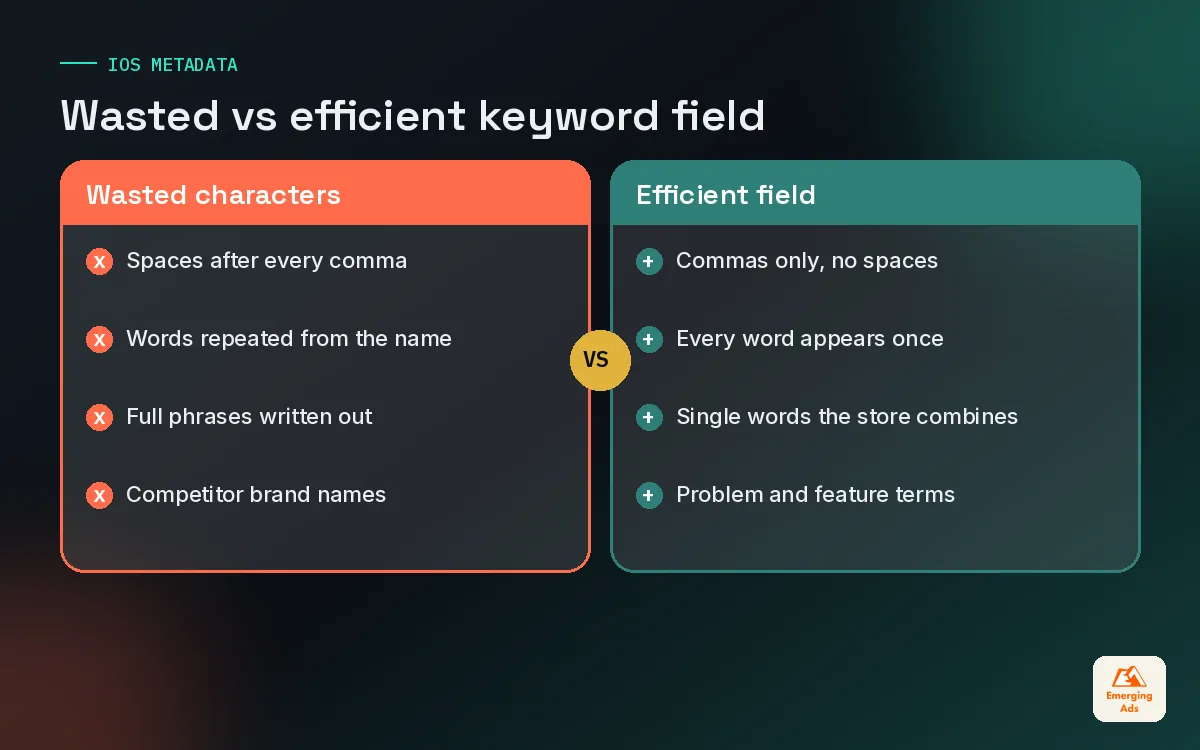
- Commas, no spaces. Separate words with commas only. A space after a comma costs a character for nothing.
- No repeats across fields. If “budget” is in the name or subtitle, it does not need to go in the keyword field. Apple combines words across the three fields.
- Single words over phrases. Write “home,plan,beginner” rather than “home workout plan for beginners”. The algorithm can combine them, and you save space for more words.
- Skip filler. Words like “app”, “free” and the category name tend to add little. Spend the space on descriptive terms.
- Plurals with care. We test whether a plural ranks on its own before spending characters on it. Results vary by term and by country.
- Strongest words in the name. Weight appears to follow the name first, then subtitle, then field. Put your single most valuable keyword in the name if it still reads naturally.
| Field | Character limit | Visible to users | What we put there |
|---|---|---|---|
| App name | 30 | Yes | Brand plus one high-value keyword |
| Subtitle | 30 | Yes | A benefit phrase with two or three keywords |
| Keyword field | 100 | No | Comma-separated single words, no repeats |
| Description | 4,000 | Yes | Written for conversion only, not read for search |
If a word appears twice across your name, subtitle and keyword field, you have paid for it twice and ranked for it once.
05Google Play keywords: writing a description that ranks and sells
Google Play works differently. There is no hidden keyword field. The title (up to 30 characters), short description (up to 80) and full description (up to 4,000) are all read for search. That rewards a well written description and punishes a lazy one.
Our approach to Google Play keywords is to write the description for a human first, then edit for search. The first few lines matter most because people see them before tapping to expand. We work the primary phrase into the title or short description, then use each priority phrase naturally a few times through the full description, in headings, feature bullets and a closing summary.
What to avoid
- Keyword lists at the bottom of the description. They read as spam to people and add little value.
- Repeating the same phrase in every paragraph. It makes the copy unreadable, and density alone does not win rankings.
- Claims you cannot back up, like “number one app”. Store policies restrict misleading text, and users distrust it anyway.
Paid search can speed this up. When we run app install campaigns, the search terms reports from Google App campaigns and Apple’s App Store search ads show us which phrases convert into real users. Those become strong organic candidates, and our Google Ads specialists feed them straight back into the keyword sheet.
06Finding competitor keyword gaps
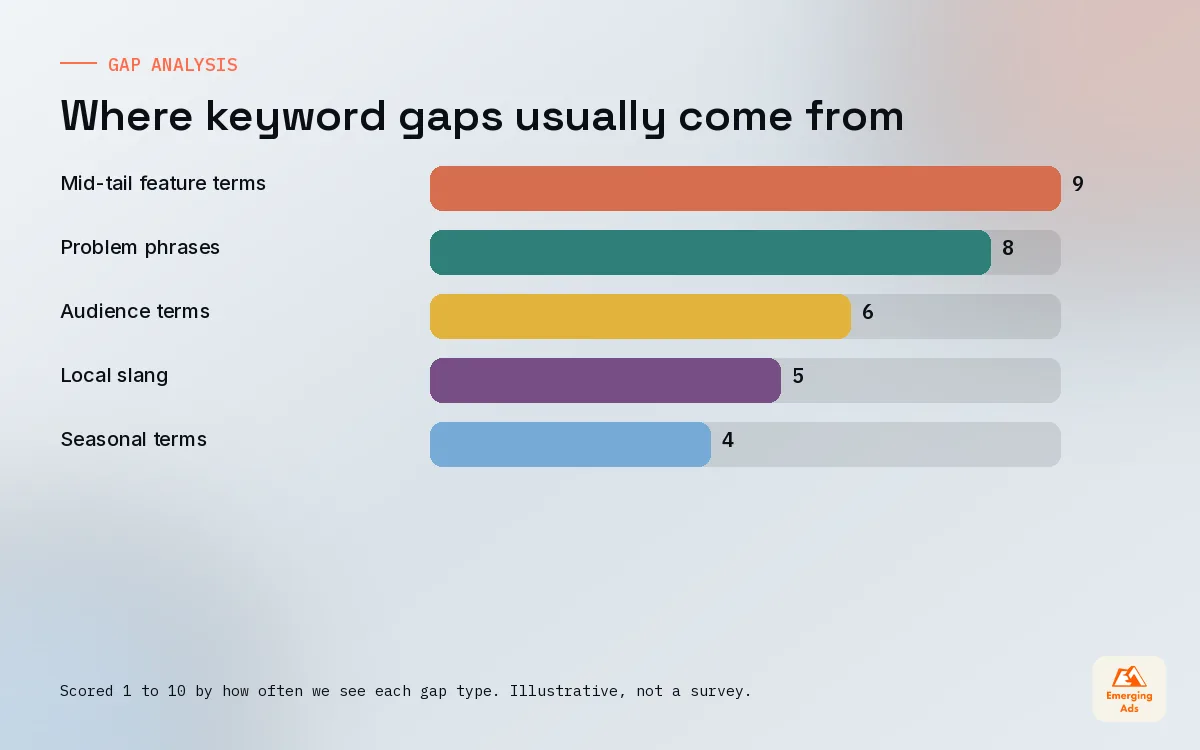
A gap is a term your competitors rank for that you do not, or a term nobody ranks well for despite clear demand. We look at three to five competitors: one market leader, two apps of similar size and one or two newer apps that have grown quickly. The fast risers are the most useful, because they usually found the mid-tail terms the leaders ignore.
How we run the gap analysis
- Export the ranking keywords for each competitor in each target country from your ASO tool.
- Remove brand terms and anything irrelevant to your app.
- Mark terms where at least two competitors rank in the top 20 and you do not rank in the top 50.
- Check each one against your store page. Could your screenshots and subtitle answer that search?
- Score with the three-question filter and add winners to the next update.
Web research tools help on the edges. Our Semrush research work often shows how competitors describe themselves in web search, and that language frequently mirrors what they target in the stores.
07Localisation keyword tricks that most teams miss
Translating your keywords is not localisation. People in different markets describe the same need with different words, and direct translation often lands on terms nobody searches. We research each priority market from scratch, ideally with a native speaker reviewing the shortlist.
Two practical points come up again and again. First, on the App Store, some storefronts index more than one localisation. The exact pairings change, so check Apple’s current documentation, but where they exist you can place different keywords in each localisation and widen your reach in that country. Second, markets with heavy English use still deserve their own research, because spelling and slang differ.
| Mistake | What happens | What we do instead |
|---|---|---|
| Machine-translated keyword field | Ranks for terms nobody types | Fresh research per market with native review |
| Same keywords in every localisation | Wastes extra indexed space | Spread distinct terms across localisations |
| English slang assumed everywhere | Misses local phrasing | Check autocomplete in each storefront |
| Screenshots left in one language | Low conversion on local terms | Localise captions for top markets first |
This is close to the thinking our international SEO team uses on websites: search behaviour is local, so the research has to be local too. Localised screenshot captions matter as much as the words, and we often mock up variations in Figma before committing to production.
08Tracking rankings and setting an iteration cadence
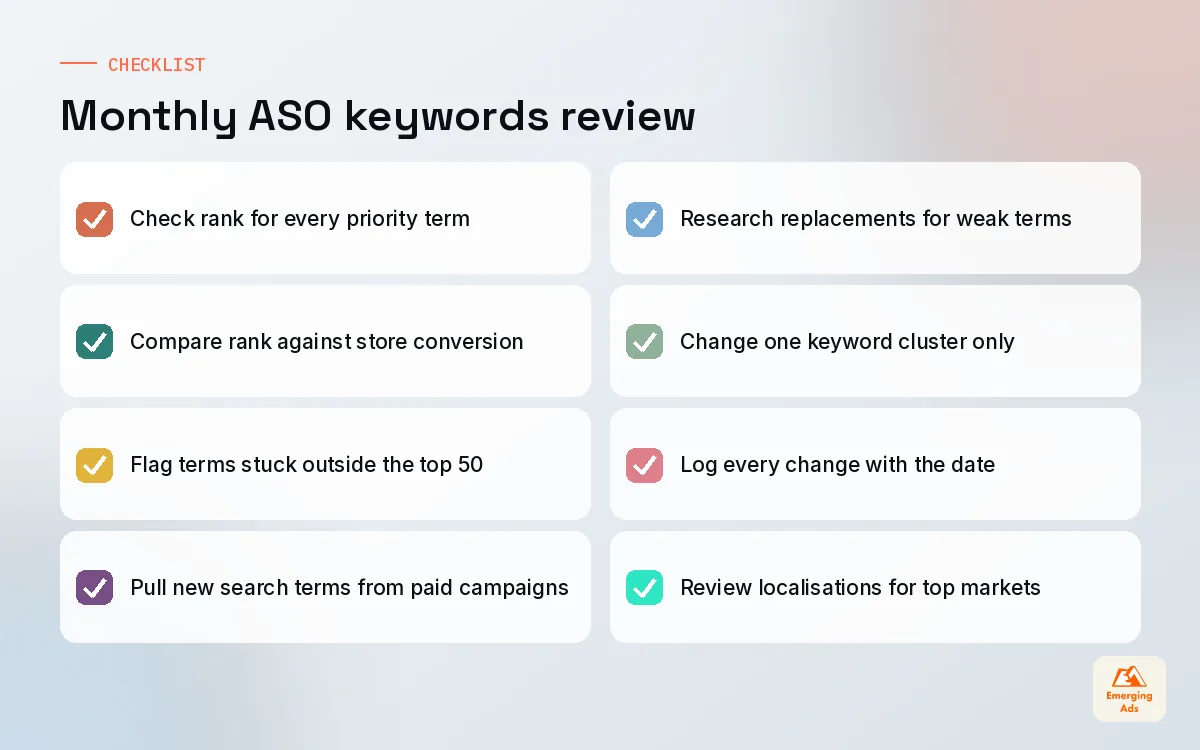
Keyword work without measurement turns into guessing. We track three things for every priority term: rank position, impressions from that search where the console shows it, and conversion rate on the store page. A keyword can rank well and still be a poor choice if the people it brings in do not install.
Our monthly ASO keywords loop
- Week 1: review rankings and store analytics, mark terms that slipped or never moved.
- Week 2: research replacements and draft new metadata.
- Week 3: ship the update with the app release or as a metadata update where the store allows it.
- Week 4: let rankings settle, note early movement, do not change anything yet.
Rankings can take a couple of weeks to settle after a change, so changing everything every week makes it impossible to learn anything. We change one cluster at a time and keep a written log of every edit with the date. Six months in, that log is the most valuable ASO document the client owns. We usually pipe ranking and install data into a Looker Studio dashboard so the founder can see progress without logging into three tools.
09How ASO keywords fit with the rest of your growth
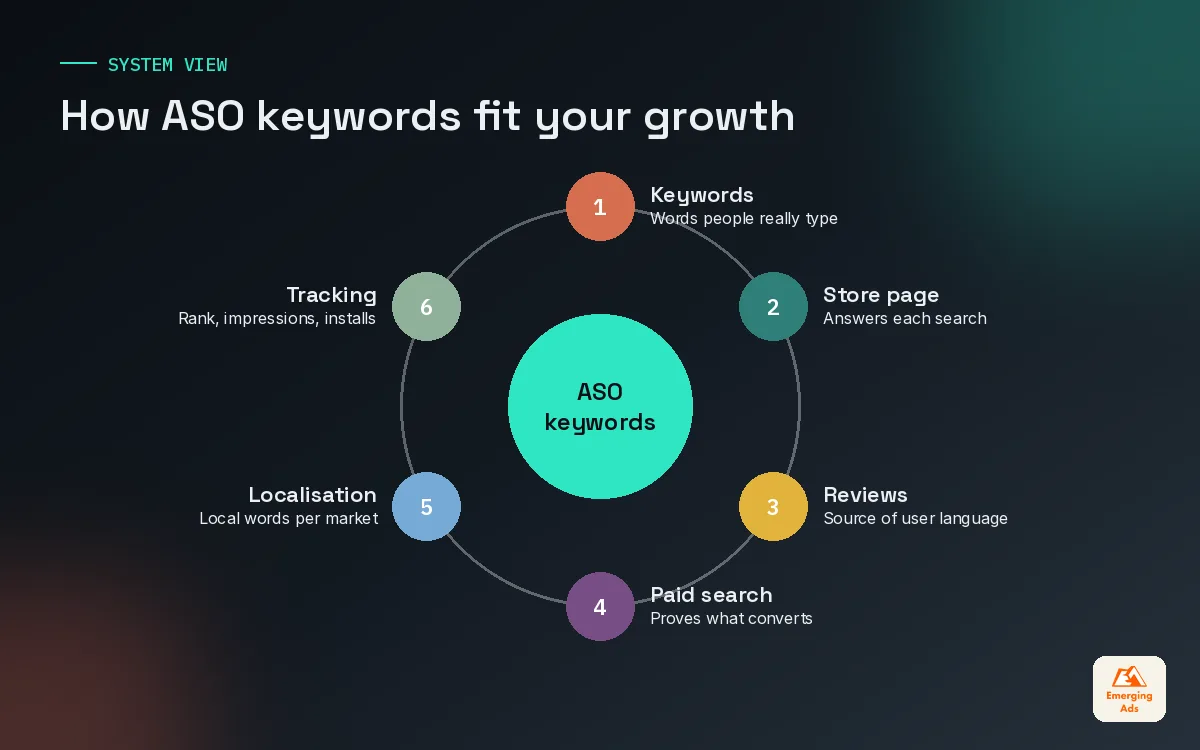
Keywords bring the right people to your store page. The page converts them. Paid campaigns and retention keep the business healthy. On accounts we manage, the strongest results come when keyword choices, store creative and paid search terms all point at the same problems. If you are still building the paid side, our guides to running app install campaigns and app user acquisition show how the pieces connect.
If you would rather hand this over, keyword research and metadata sit inside our wider app marketing work, and you can see everything else we cover on our services page. You will find more articles like this on the youremergingads.com homepage.
Frequently asked questions
Straight answers to what clients ask us most about aso keywords.
What are ASO keywords?
How many keywords should an app target?
Does Apple use the app description for search?
Should I put competitor brand names in my keyword field?
How long does it take for ASO keyword changes to show results?
Is keyword stuffing effective on Google Play?
What tools do you use for ASO keyword research?
Should I use singular or plural keywords on iOS?
How do I find keywords my competitors rank for?
Do ASO keywords need to be different in each country?
How often should I update my app keywords?
Want to know which keywords your app could own next month?
We will pull your current rankings, map the gaps against three competitors and hand you a prioritised keyword plan for both stores. No retainer required to see it.
Book your free audit