The App Ad Creative Guide We Hand to Every New Client
Your app ad creative now does the targeting that audiences used to do. This is the working guide we give new clients: the concepts that earn retained users, how to test them, and how to keep winners alive longer.
Key takeaways
- App ad creative is your main targeting tool now. The hook and the person on screen decide who stops scrolling, and the algorithm learns from them.
- Test concepts before variations. Four genuinely different ideas teach you more than forty edits of one idea.
- The first three seconds carry most of the result, so write several hooks for every concept and test them as a set.
- Judge creative on cost per retained user and payback, not on click-through rate. Some of the cheapest clicks bring the weakest users.
- Plan fatigue in advance: iterate winners while they still perform and keep a weekly flow of new concepts entering testing.
01Why app ad creative now does the targeting for you
Most new clients arrive believing their problem is audiences or bidding. When we open the account, the problem is almost always the app ad creative. There are six ads live, four of them variations of the same screen recording, and the best one has been running for three months. The campaigns are not broken. They are starving.
Here is why. Since Apple’s App Tracking Transparency arrived with iOS 14.5 in April 2021, apps have had to ask permission before tracking people across other companies’ apps and sites. Detailed targeting lost much of its precision, and the platforms responded with broad, automated delivery. In that setup, the creative is the targeting. The words in the first frame, the face on screen and the problem you name all decide who stops, and the platform learns who to find next from those people.
So when we say creative is the biggest lever in app growth, we do not mean it in a vague, brand-building way. We mean it mechanically. A fitness app ad that opens on a tired parent at 6am finds a different audience from one that opens on a gym regular lifting heavy. Same app, same budget, completely different cohort.
What this guide covers, and what it leaves out
This is the creative half of the system. If you want the full picture of channels, budgets and scaling rules, our guide to app user acquisition covers that. Here we stay focused on concepts, hooks, formats, testing, fatigue and briefs: the work that decides whether your media budget has anything good to spend on.
02The app ad creative concepts that keep working
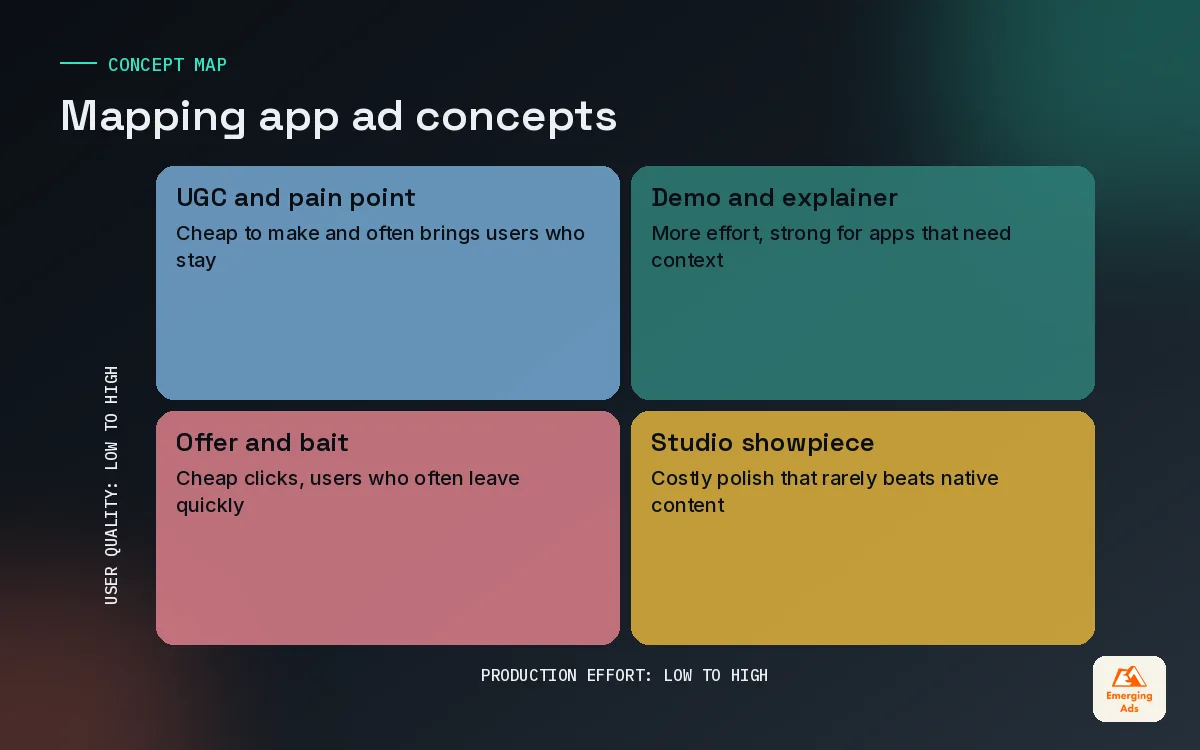
A concept is the core idea of an ad: the reason someone should care. Formats, edits and hooks all sit on top of it. Across the subscription apps, games, fintech, health and ecommerce apps we run, a handful of concept families keep producing users who stay.
| Concept | What it looks like | Works best for | Watch out for |
|---|---|---|---|
| UGC testimonial | A real-feeling person explains what changed for them | Subscription, health and fitness, edtech | Claims you cannot back up in the product |
| Problem and solution | Name a specific frustration, then show the app fixing it | Fintech, productivity, on-demand services | Problems so generic nobody recognises themselves |
| Feature demo | Screen recording of one feature doing one job | Utilities, finance, marketplaces | Cramming every feature into one ad |
| Gameplay | Real or lightly staged play, often with a fail or tease | Casual and mid-core games | Showing gameplay the app does not deliver |
| Before and after | A visible change over time or one task done two ways | Fitness, learning, photo and design apps | Unrealistic results that bring the wrong users |
| Offer led | A trial, a first order discount or a bonus up front | Ecommerce, food delivery, subscriptions | Users who leave the moment the offer ends |
The mistake is choosing one family and living in it. A language learning app we picked up had spent a year on polished feature demos. They were clean, on brand and flat. When we added a creator talking about freezing up on a work call in another language, the cost per Day-7 learner dropped noticeably in the first fortnight. The product had not changed. The reason to care had.
Concepts that tend to bring the wrong users
- Pure curiosity bait. Odd visuals that earn clicks but say nothing about the app. Great click-through rate, poor Day-1 retention.
- Fake gameplay. Showing a puzzle mechanic the game barely uses. You will pay for installs that uninstall within the hour.
- Discount only. Fine as a test, dangerous as a strategy. It teaches the platform to find people who wait for deals.
03Hooks: winning the first three seconds
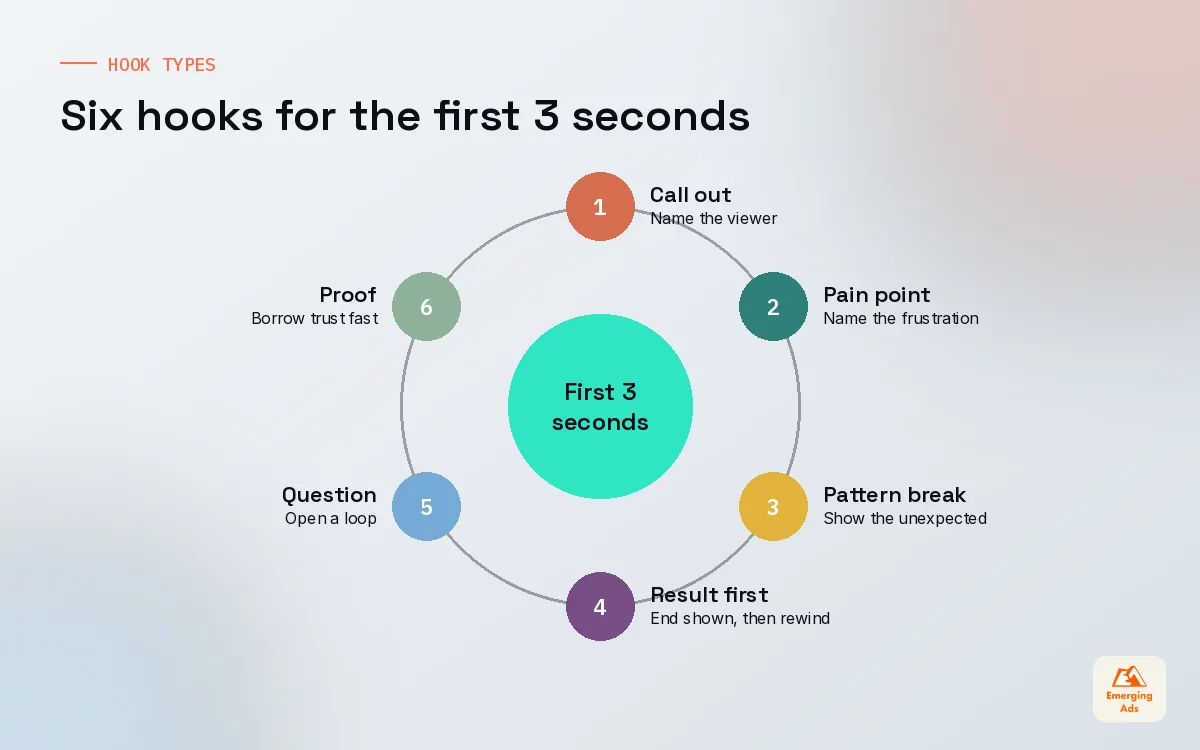
On feed platforms, most of an ad’s result is decided before anyone hears the app’s name. We treat the opening three seconds as a separate creative problem, and for every concept we write at least three hooks before anything is filmed.
A good hook does one of three jobs: it names the viewer, it names their problem, or it shows something they did not expect. The best do two at once. “If you have tried three budgeting apps and quit all of them” names the viewer and the problem in a single line.
| Hook type | Example opening | Why it works |
|---|---|---|
| Call out | “Freelancers, this one is for you.” | Filters for the right person instantly |
| Pain point | “I lost two hours every week chasing invoices.” | Recognition makes people stay |
| Pattern break | Phone dropped into a glass of water, app still running | Unexpected visual stops the thumb |
| Result first | Final screen shown, then rewind to how it happened | Curiosity about the path |
| Question | “Why does your step count lie to you?” | Opens a loop the viewer wants closed |
| Social proof | Creator scrolling through real looking reviews | Borrowed trust, fast |
How we write hooks in practice
- Start from the one sentence that describes who the ad should stop.
- Write five openings: one call out, one pain point, one pattern break, one result first, one question.
- Cut anything that needs sound to make sense. Many people watch muted, so the on-screen text has to carry the hook alone.
- Keep the three strongest and film or edit them onto the same body, so the test isolates the hook.
The body of the ad sells the app. The hook decides whether anyone is still there to hear it.
04App ad creative formats for each channel
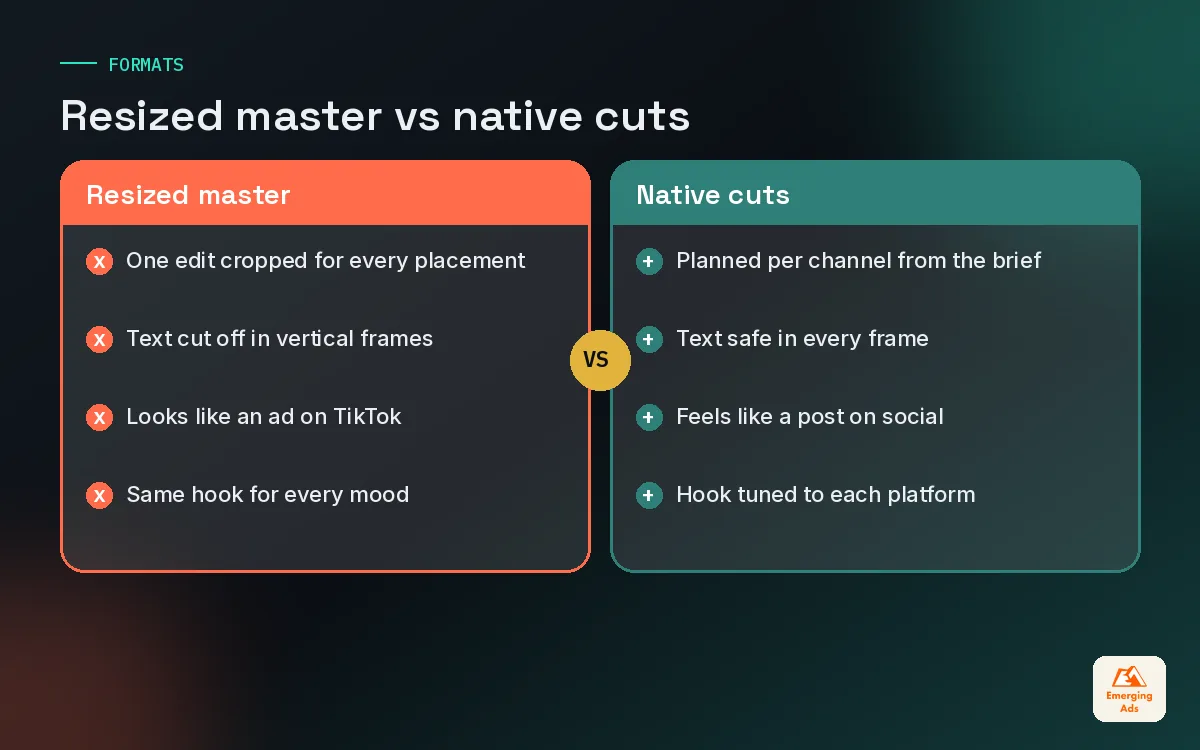
The same concept needs to be cut differently for each platform. People use TikTok, Instagram Reels, YouTube and Snapchat in different moods, and an ad that ignores that mood looks like an ad. We brief one concept and plan several native cuts from the start, rather than resizing one master file at the end.
| Channel | What tends to work | Our creative notes |
|---|---|---|
| TikTok | Creator led vertical video, native text and sound | Should look like a post first and an ad second |
| Meta (Reels, Stories, Feed) | UGC, demos and statics side by side | Statics still earn their place for offers and clear value |
| Google App campaigns | A full set of text, image and video assets | Give the system variety in every orientation it can use |
| YouTube | Longer demos and explainers, plus Shorts | Room to show the product properly for complex apps |
| Snapchat | Fast, playful, vertical, younger tone | Front load the hook even harder than elsewhere |
| Apple’s App Store search ads | Your store page assets do the work | Match screenshots to the search intent you bid on |
For TikTok, boosting real creator posts usually beats anything that looks produced, and our TikTok Spark Ads work is built around that. On Meta, our Meta app campaigns team runs video and static concepts side by side, because statics are cheap to make and often tell you which message wins before the video is even edited. For apps that need explaining, YouTube Demand Gen campaigns give you space for a proper walkthrough, and for younger audiences Snapchat ads reward speed and a lighter tone.
Do not forget the store page
Your ad is only half of the creative. The other half is the page people land on. If the ad promises a calm sleep routine and the first screenshot shows a dashboard of graphs, you lose people at the door. Apple’s custom product pages let you create additional versions of the product page for different ads, and Google Play offers custom store listings. Our app store optimisation team builds those pages from the same brief as the ads.
05An app ad creative testing framework that respects your budget
Creative testing goes wrong in two ways. Either nothing is tested properly, so the account runs on gut feel, or everything is tested at once, so no test gets enough spend to mean anything. The fix is structure: decide what you are testing, at what level, and what result counts as a win before you launch.
Level 1: Concept tests
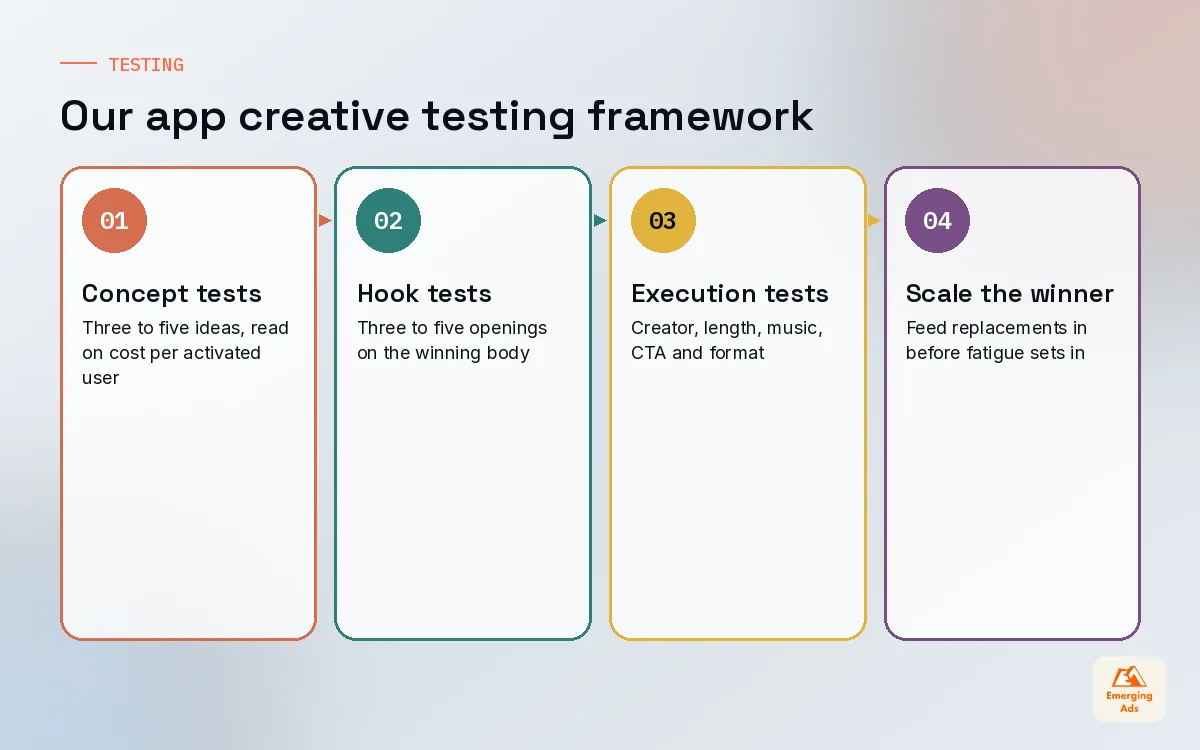
Three to five genuinely different concepts, each with its best guess at a hook. The question is simple: which reason to care finds users who stay? We read these on cost per activated user first, then cost per Day-7 user once enough data has arrived.
Level 2: Hook tests
Take the winning concept and run three to five hooks on the same body. This is where most of the extra performance hides, and it is cheap because you are only re-editing the opening.
Level 3: Execution tests
Now try different creators, lengths, music, captions and calls to action. These tests matter, but they rarely rescue a weak concept, which is why they come last.
| Test level | What changes | Primary read | Typical cadence on accounts we run |
|---|---|---|---|
| Concept | The core idea and reason to care | Cost per activated user, then Day-7 | New batch every two to four weeks |
| Hook | First three seconds only | Hold rate, then cost per activated user | Weekly on the current winner |
| Execution | Creator, length, music, CTA, format | Cost per activated user | Ongoing, smaller budget |
On iOS your read is also limited by privacy-safe attribution, so we look at creative results alongside product analytics and blended trends rather than trusting any single dashboard. The broader app marketing setup has to support this, otherwise creative decisions end up based on whichever number looks best that day.
06Spotting creative fatigue before it costs you
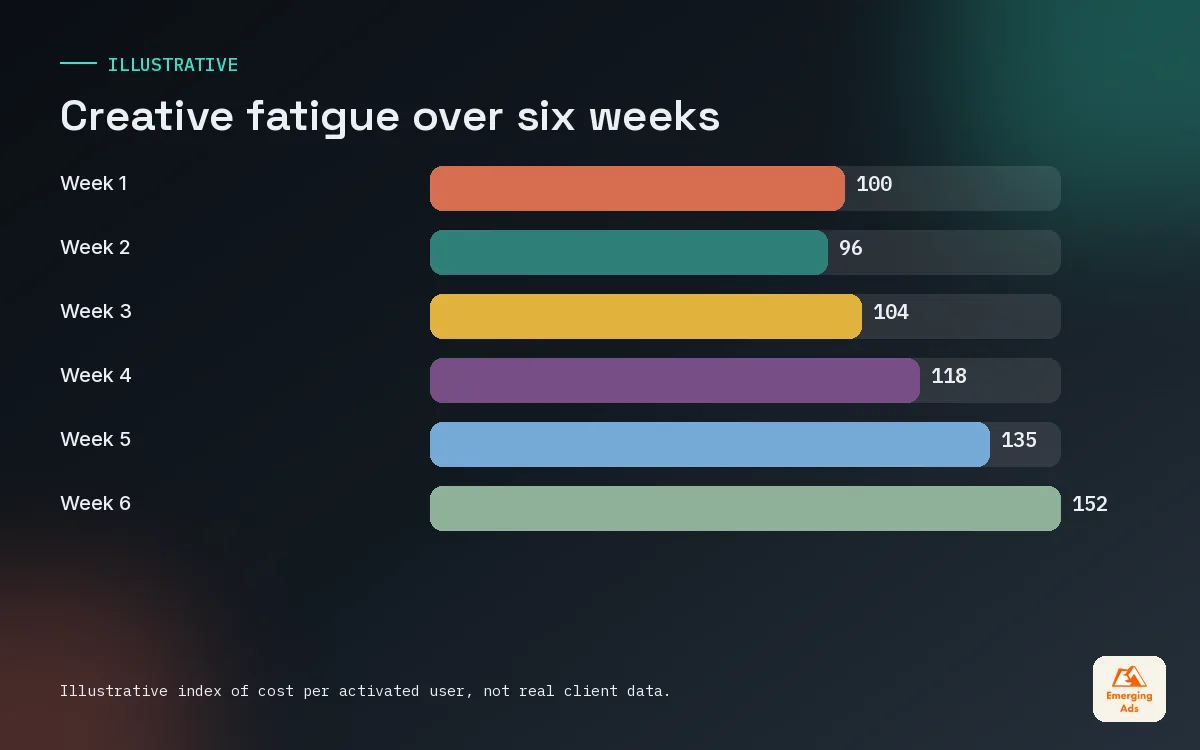
Every winning ad wears out. The only question is whether you notice before or after it has dragged your numbers down. On higher spend accounts we often see a strong concept lose its edge within a few weeks, while on smaller accounts the same ad can last for months.
- Frequency rising while click-through falls. The same people are seeing the ad and caring less each time.
- Cost per activated user creeping up week on week with no change in targeting, budget or product.
- Hold rate dropping in the first seconds. The hook has stopped surprising anyone.
- Comments turning stale or negative, such as “I keep seeing this” on social placements.
- The platform shifting spend away from an old winner on its own, which is often an early warning.
None of these alone proves fatigue. Two or three together usually do. When we see that pattern we do not pause the ad straight away. We start feeding its replacement into the same campaign first, so the account never runs dry.
07Iterating winners without killing what made them work
When something works, the temptation is to duplicate it twenty times with tiny changes. That rarely helps. The platform tends to treat near copies as the same ad, and you learn nothing new. Good iteration keeps the core of the winner and changes one meaningful thing at a time.
| Iteration move | What stays | What changes |
|---|---|---|
| New hook | Concept, body, call to action | First three seconds |
| New face | Script and structure | Creator, age, setting |
| New format | Message and hook | Static, carousel, longer cut, Shorts |
| New angle on the same pain | The problem being solved | The situation it shows up in |
| New proof | Concept and hook | The testimonial, result or review shown |
A meal planning app we work with had one UGC ad that carried the account for weeks: a parent opening an almost empty fridge on a Wednesday. We kept the fridge and the Wednesday, and changed the person, the room and the first line. Six iterations later, four were still pulling their weight. The original idea lasted far longer because it kept looking new.
When to stop iterating
If three solid iterations of a concept all underperform the original, the concept itself is tiring, not just the execution. That is the signal to move the budget towards your next concept test rather than squeezing another edit out of an idea the audience has already seen.
08Briefing creators and designers for app ads
Weak briefs produce weak ads, and most app briefs are weak in the same way: they describe the app instead of the viewer. A creator does not need your feature list. They need to know who they are talking to, what that person is struggling with, and what one thing the app does about it.
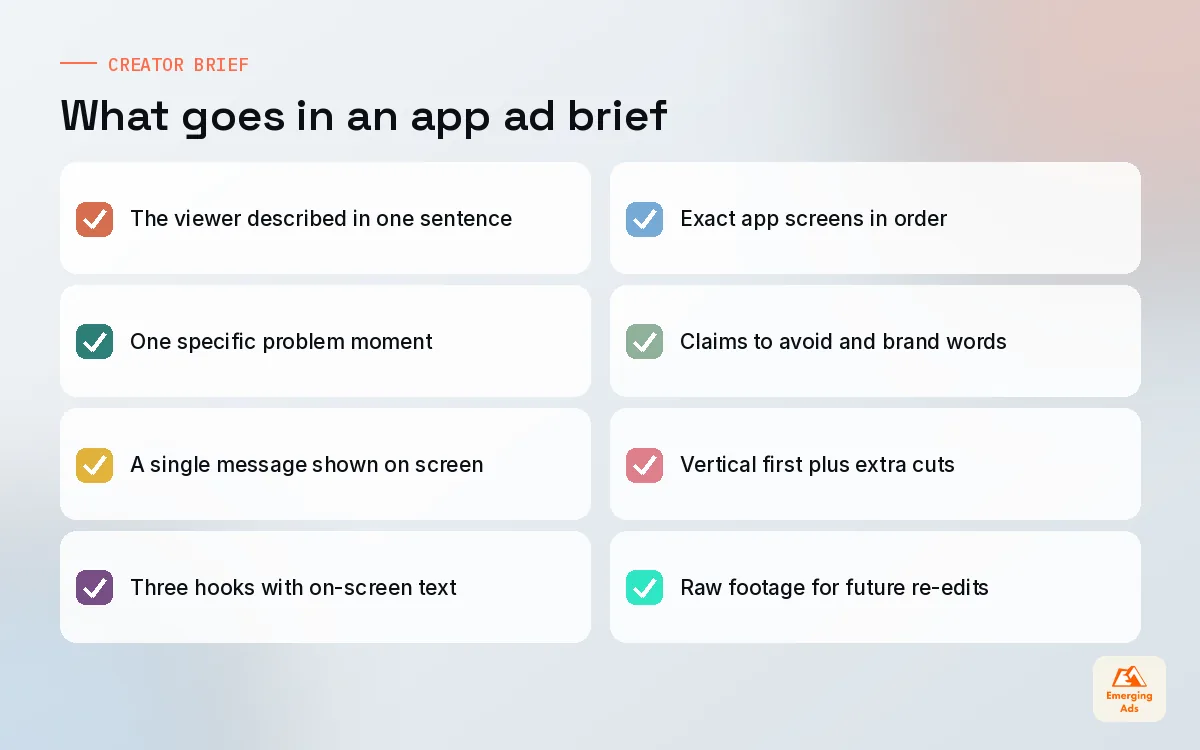
What goes in every brief we send
- The viewer in one sentence. Who the ad should stop, in plain words.
- The problem. The specific moment of frustration, not a category.
- The single message. One benefit, shown on screen, not just said.
- Three hooks to film. Written out, with on-screen text for muted viewing.
- What to show in the app. The exact screens, in order, with test accounts ready.
- Do and do not. Claims to avoid, brand words to use, anything legal needs to approve.
- Deliverables. Vertical first, plus any square or horizontal cuts, and raw footage for re-edits.
We ask for raw footage every time. Many of our best hook tests come from re-editing footage we already own rather than paying for new shoots. Our video content production team films both creator style and polished pieces, and for statics and end cards our Canva design services keep turnaround fast. When the product screens themselves need tidying for ads or the store page, our Figma design work handles the mock-ups.
09Putting your app ad creative system into practice
The apps that win on creative are rarely the ones with the biggest production budgets. They are the ones with a rhythm: a weekly slot for new hooks, a monthly batch of new concepts, a clear rule for what counts as a winner, and a habit of reading results on retained users rather than clicks.
| Week | Creative task | Owner |
|---|---|---|
| Every week | Review fatigue signals and launch new hooks on the current winner | Media buyer with creative lead |
| Every two weeks | Brief and launch a new concept batch | Creative lead |
| Every month | Review concepts by cost per Day-30 user and update the concept list | Growth lead |
| Every quarter | Refresh store page assets to match the winning messages | ASO and design |
If you would like to see how creative fits with the rest of what we do, the full list of EmergingAds services shows how media, creative, analytics and lifecycle work connect, and our client success stories show what that looks like on real accounts. For more on budgets, the main site also explains what app install campaigns cost. The rest of our app growth notes live on the youremergingads.com homepage.
Frequently asked questions
Straight answers to what clients ask us most about app ad creative.
What makes good app ad creative?
How many creatives should an app test at once?
Is UGC better than polished video for app ads?
How long does an app ad last before it fatigues?
Should app ads show the actual app interface?
What is the difference between a concept test and a variation test?
Do static images still work for app install ads?
How should we measure app ad creative on iOS?
What should a creator brief for an app ad include?
Can AI tools replace creators for app ads?
How often should app creative be refreshed?
Is your creative finding users who still open the app on Day 30?
We will review your live ads, hooks and testing setup and show you which concepts are worth scaling and which are quietly burning budget.
Book your free audit