The Practical Mobile Measurement Partner Guide We Hand to New Clients
Your mobile measurement partner decides which numbers your whole growth team argues about. This is the setup guide we give every new app client before a single pound of budget goes live.
Key takeaways
- A mobile measurement partner is the neutral referee between your app and every ad network, so its setup shapes every budget decision you make.
- Attribution works differently on iOS and Android: plan for consented device data, aggregated Apple frameworks and the Google Play Install Referrer side by side.
- Pick an MMP on data access, network integrations, fraud tools and contract terms, not on the prettiest dashboard in the demo.
- Write an event plan before the SDK goes in. Eight to twelve well named events beat sixty vague ones every time.
- Connect the MMP to your ad networks and product analytics so bidding, reporting and retention work all read from the same source.
01What a mobile measurement partner actually does
Every app founder we onboard has the same moment of confusion. Meta says the campaign drove 900 installs. Google says 700. The app store console says 1,100 total, and the finance sheet says revenue barely moved. A mobile measurement partner, usually shortened to MMP, exists to settle that argument. It sits between your app and the ad networks, collects the install and in-app events, decides which campaign earned credit, and sends a consistent version of the truth back to everyone.
The word that matters is neutral. Each ad network has a natural incentive to claim as much credit as it can, and each one uses its own windows and rules. An MMP applies one rulebook across all of them. That is why we treat it as plumbing, not as a nice extra. When a client asks us to scale an app on several channels at once, the first thing we check is whether the measurement layer can tell those channels apart.
The four jobs an MMP does
- Attribution. Matching an install or re-engagement to the ad click or view that caused it, across every network you run.
- Event collection. Recording what users do after the install, such as registrations, trials, purchases and subscriptions, through an SDK in your app.
- Postbacks. Sending those conversions back to the ad networks so their algorithms can optimise toward people who actually pay, not just people who install.
- Protection and reporting. Filtering suspicious traffic, deduplicating claims and giving you cohort reports by channel, campaign and creative.
The common MMPs you will meet are AppsFlyer, Adjust, Branch and Singular. They overlap heavily on core attribution and differ on pricing models, deep linking strength, cost aggregation and how much raw data they let you export. We will come back to choosing between them.
02How mobile attribution works on iOS and Android
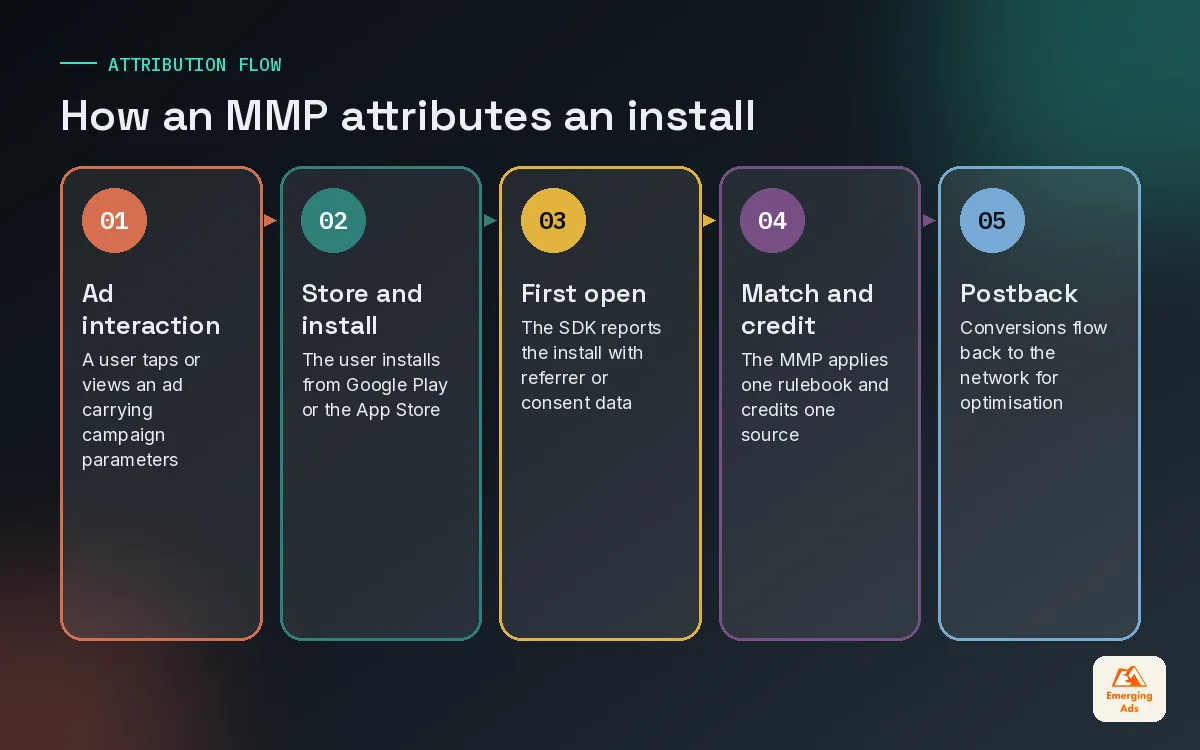
Attribution on apps is harder than on the web because there is no simple cookie trail. The user clicks an ad, leaves for an app store, installs, and opens the app as a fresh process. The MMP has to reconnect those dots after the fact, and the methods it is allowed to use depend on the platform.
Android: the Install Referrer does the heavy lifting
On Android, Google Play provides the Install Referrer API. When someone installs from a Play Store link that carries campaign parameters, the app can read that referrer on first open and pass it to the MMP. It is deterministic, it is reliable, and it is the reason Android attribution data is usually the cleaner half of any report we see. Where the referrer is missing, MMPs fall back to other matching methods, which is where differences between vendors start to show.
iOS: consent first, then aggregated frameworks
Apple changed the rules with App Tracking Transparency in iOS 14.5, released in April 2021. Apps must ask permission before tracking users across other companies’ apps and sites, which limits access to the IDFA, the device identifier that used to make iOS attribution simple. For users who consent, MMPs can still attribute at the device level. For everyone else, Apple’s own privacy preserving frameworks take over: SKAdNetwork, and more recently AdAttributionKit, which Apple introduced in 2024 to work alongside it.
We keep this section short on purpose. SKAN conversion values, postback windows and schema design deserve their own guide, and the main point here is practical: your MMP should be the place where consented iOS data, aggregated Apple postbacks and Android referrer data come together in one report, with each source clearly labelled. If your dashboard blends them silently, you cannot judge iOS performance honestly.
| Signal | Platform | Level of detail | What we use it for |
|---|---|---|---|
| Install Referrer | Android (Google Play) | Device level, deterministic | Campaign and creative level decisions |
| Consented IDFA | iOS, opted in users only | Device level | Cohort LTV and retargeting where allowed |
| SKAdNetwork / AdAttributionKit | iOS | Aggregated, delayed | Channel and campaign direction on iOS |
| Network self reported data | Both | Network’s own rules | Sense checks only, never the source of truth |
| Product analytics | Both | User level inside your app | Retention, funnels and feature use |
03How to choose a mobile measurement partner
Sales demos for MMPs look very similar. Clean dashboards, a wall of network logos, a fraud slide. The differences that matter sit underneath, and they are usually only discovered six months in, when someone needs raw data or the contract renews. This is the scorecard we walk clients through before they sign.
| Question to ask | Why it matters | Red flag |
|---|---|---|
| Can we export raw, row level data at no extra cost? | You will want it in your warehouse or dashboards eventually | Raw data locked behind a premium tier |
| Which of our ad networks are integrated, and how deep? | Cost data, postbacks and audiences all depend on it | Key network only supports basic install postbacks |
| How is pricing calculated? | Attribution based pricing grows with your success | Overage fees you cannot model in advance |
| What fraud protection is included? | Paying for fake installs ruins every metric downstream | Fraud tools sold as a separate add on |
| How does it handle iOS aggregated data? | Your iOS reporting depends on it | No clear split between modelled and observed numbers |
| What are the contract length and exit terms? | Switching MMPs is painful but sometimes necessary | Multi year lock in with auto renewal |
Notice that none of those questions are about the user interface. Your growth team will live in exports, ad network dashboards and whatever reporting layer you build on top. Many of our clients push MMP data into a Looker Studio dashboard so founders see one weekly view with spend, installs, trials and revenue together. If the MMP makes that hard, it does not matter how nice its own charts are.
Match the MMP to the stage of the app
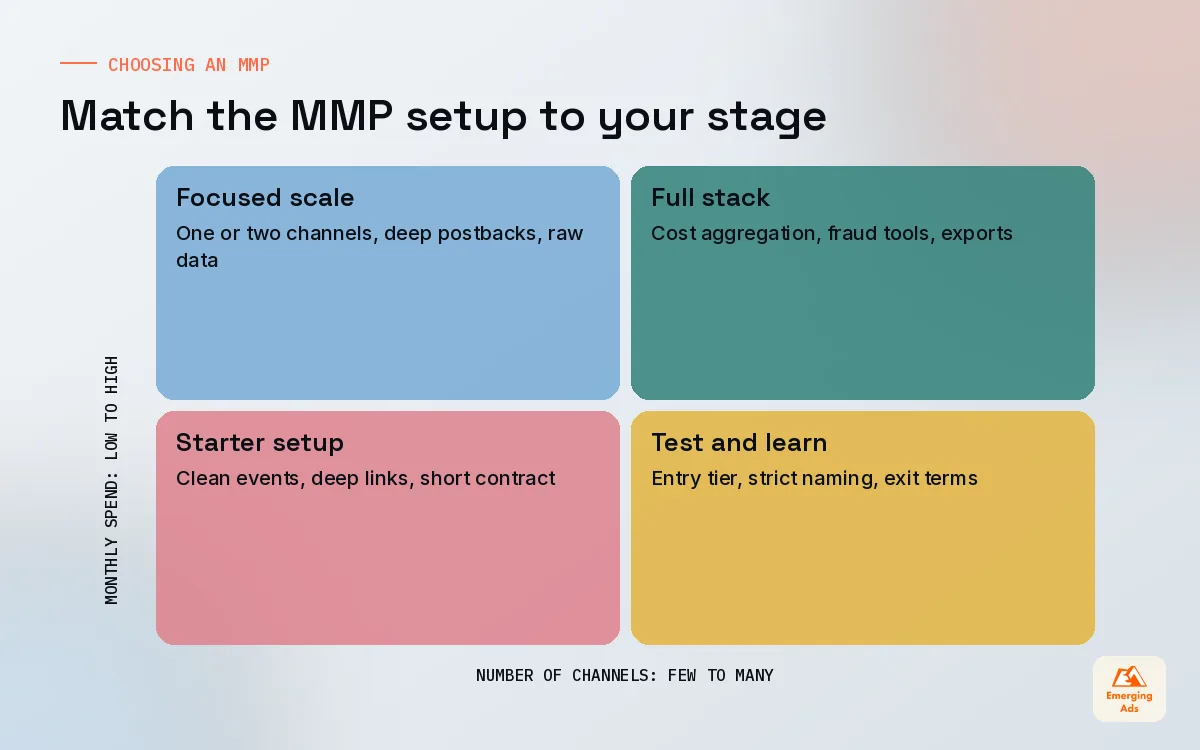
A pre launch app with one channel does not need the same setup as a subscription business spending across four networks. Early on, we prioritise clean events, solid deep links and a contract you can exit. Once spend grows, cost aggregation, raw data exports and incrementality support start to earn their price. Buying the enterprise package on day one is one of the more common ways we see seed stage apps waste money.
04Planning events before the SDK goes in
The single biggest predictor of a healthy MMP setup is whether someone wrote an event plan before the developers started. When there is no plan, you end up with sixty events, half of them duplicates, named by three different engineers over two years. Nobody trusts them, so nobody optimises toward them.
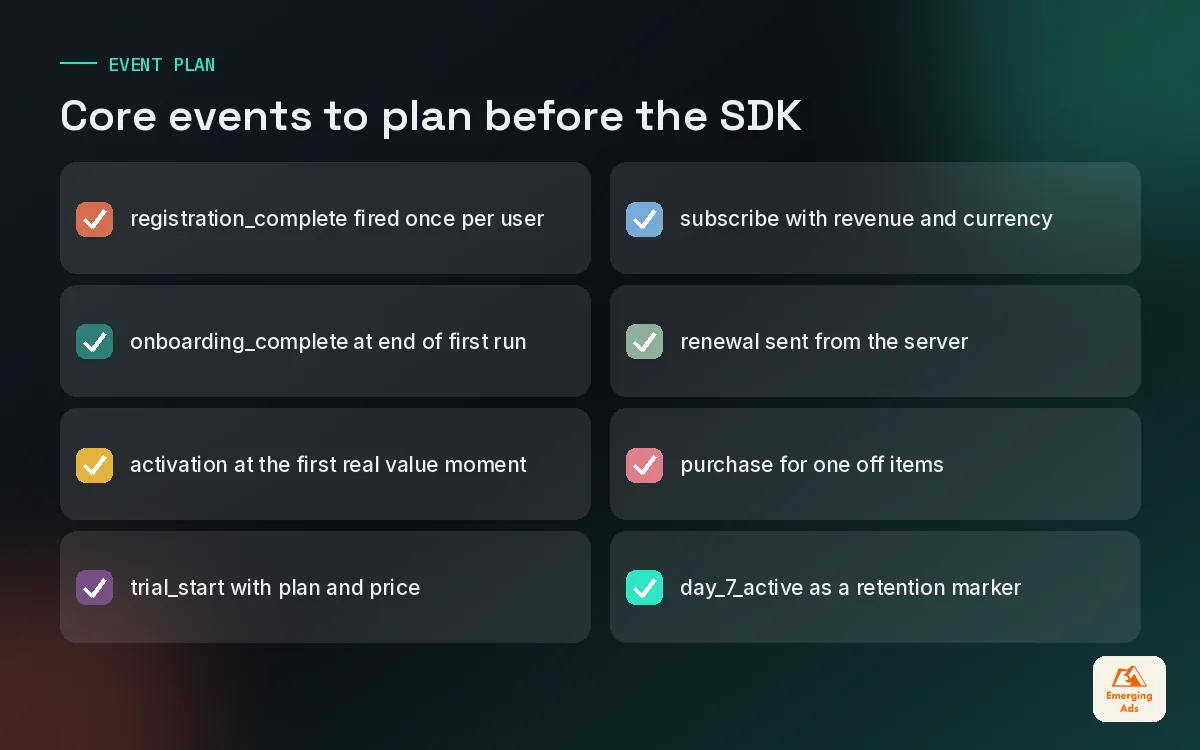
Our rule is to start with eight to twelve events that map to the money. Each one needs a clear name, a single definition, the screen or server action that fires it, and the parameters it carries. Here is the starter plan we adapt for most subscription apps:
- registration_complete: account created, fired once per user.
- onboarding_complete: the user finished the first run flow.
- activation: the first moment of real value, defined per app (first workout logged, first transfer sent, first lesson finished).
- trial_start: free trial began, with plan and price as parameters.
- subscribe: first paid conversion, with revenue and currency.
- renewal: each subsequent paid period, ideally sent from your server.
- purchase: one off in-app purchases, with value.
- day_7_active: a derived event that tells networks which users stuck around.
For games, ecommerce and marketplace apps we swap in level milestones, add to basket, first order and repeat order. The principle holds: fewer, cleaner events that your app install campaigns can actually optimise toward.
Server side events for revenue
Subscriptions renew when the app is closed. Refunds happen days later. If revenue only fires from the device, your MMP will undercount renewals and never see refunds. We send revenue events from the server wherever the MMP supports it, and we document which events are client side and which are server side so nobody double counts. This is the same discipline we apply in any conversion tracking setup, whether it is a website or an app.
05Deep linking basics every app needs
Deep links send a user to a specific screen inside the app rather than the home screen. Deferred deep links do the same for someone who does not have the app yet: they install first, then land on the right screen on first open. Most MMPs offer a deep linking product, and some, Branch in particular, built their reputation on it.
Why should a growth team care? Because context sells. A user who tapped an ad for a specific product, workout plan or course and then lands on a generic home screen often drops. On accounts we manage, routing ad traffic and retargeting clicks to the exact promised screen is one of the cheapest conversion wins available. It also makes email and messaging campaigns far more useful, because every link can open the relevant place in the app.
- Set up one link domain per brand and use it everywhere: ads, email, social bios, QR codes.
- Test every link on a fresh install for both platforms before a campaign launches, not after.
- Give each deep link a fallback page for desktop visitors so web traffic is not wasted.
- Keep campaign parameters in the link consistent with your MMP naming, so attribution and routing agree.
06Fraud protection and data hygiene
Mobile ad fraud is not a theoretical risk. Click spamming, install hijacking, bots and device farms all exist to steal attribution credit, and they cluster wherever payouts are high. The visible damage is wasted budget. The quieter damage is worse: fake installs drag down retention rates, confuse optimisation and make good channels look bad by comparison.
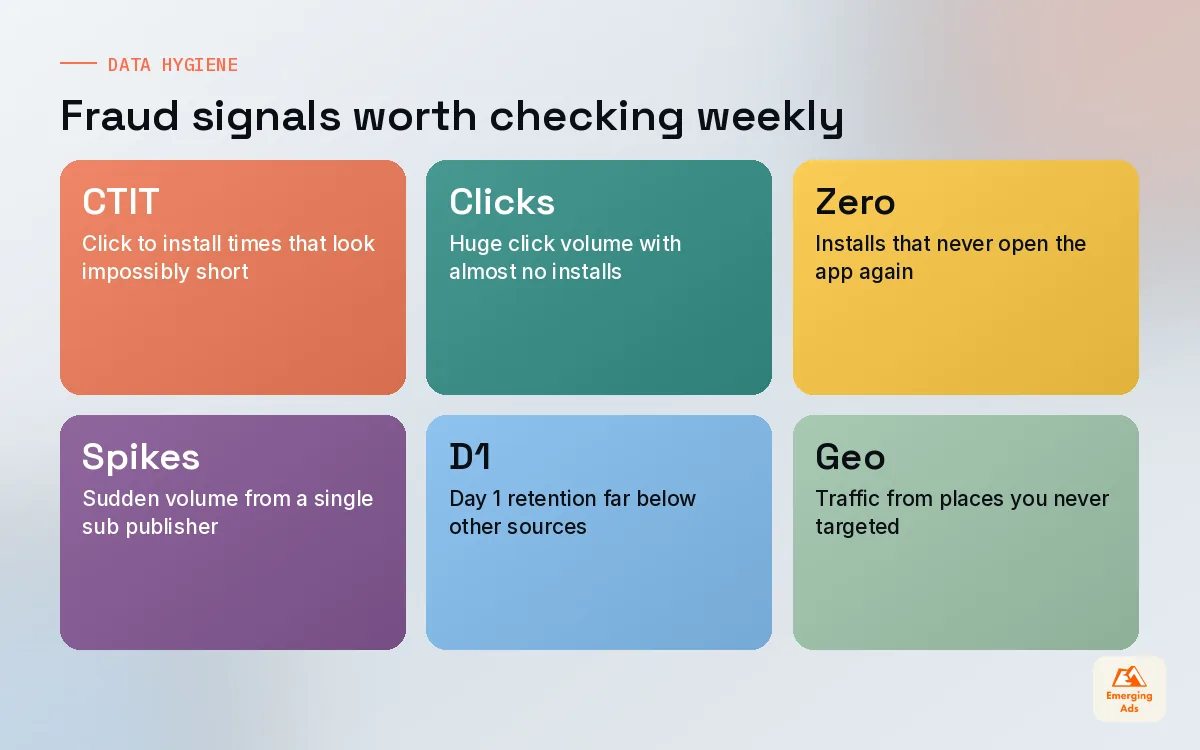
Every major MMP offers fraud protection, but the defaults are rarely tuned for your app. These are the patterns we look for in the first month of any audit:
| Pattern | What it often signals | First action |
|---|---|---|
| Very short click to install times | Click injection or install hijacking | Review the source and enable blocking rules |
| Huge click volume with tiny conversion | Click spamming | Tighten attribution windows for that source |
| Installs with zero sessions afterwards | Bots or device farms | Ask the network for a breakdown and a credit |
| Sudden spikes from one sub publisher | Low quality inventory | Exclude the sub publisher and monitor |
None of these are proof on their own. They are prompts to look closer. The habit that protects you is a weekly glance at installs, Day 1 retention and cost per retained user by source. When one source suddenly looks cheap and nobody stays, treat it as suspicious until proven otherwise.
A cheap install that never opens the app twice is not cheap. It is a cost you have not noticed yet.
07Connecting your MMP to ad networks and analytics
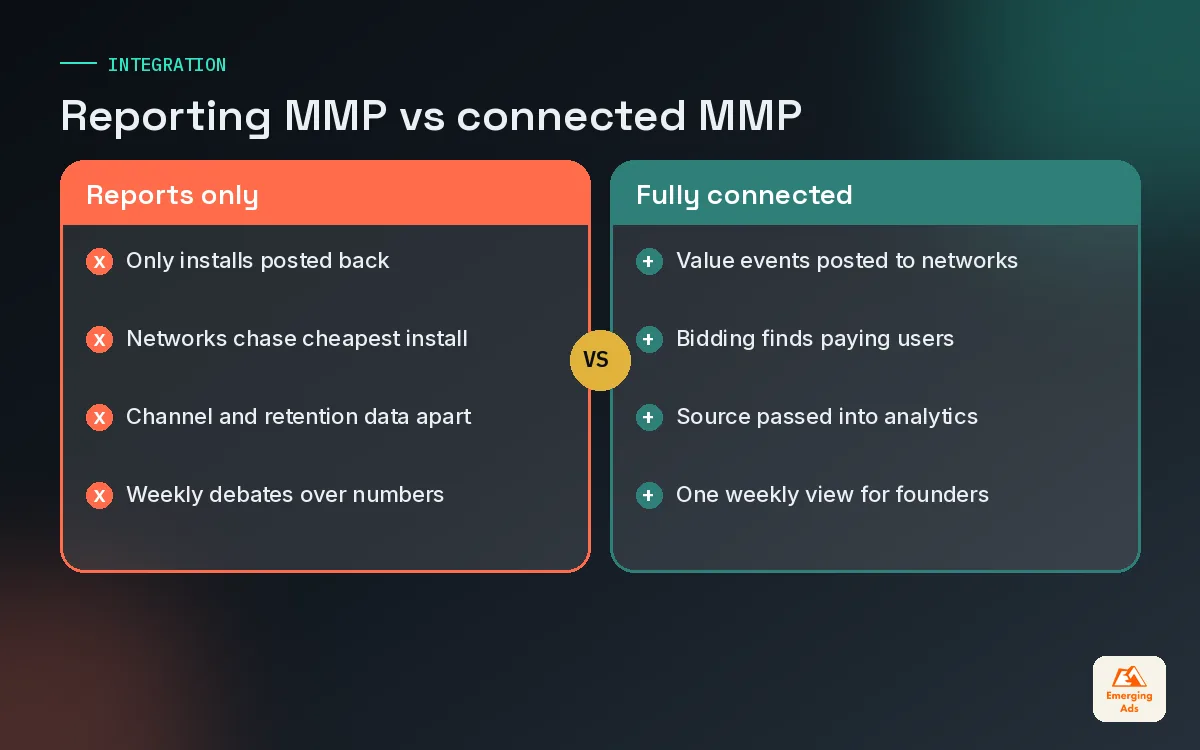
An MMP that only produces reports is half used. The real value appears when it feeds the systems that spend your money and the tools that explain user behaviour.
Postbacks to ad networks
Each network you run needs to receive the in-app events you care about, mapped to its own event names. That is how Meta app campaigns learn to find subscribers rather than casual installers, and how Google App campaigns, which run across Search, Google Play, YouTube, Discover and the Display Network, find users who complete a trial. We see a lot of accounts where the MMP is connected but only installs are posted back, so every algorithm is optimising toward the cheapest install. Fixing that mapping is often the first real performance lift a new client sees, and it is a standard step in our Google Ads management onboarding.
The same applies to newer channels. When a client starts testing TikTok ads for an app, the first question is not the creative, it is whether the MMP integration is live and posting the right events back.
Feeding product analytics
Your MMP knows where users came from. Your product analytics tool, such as Mixpanel, Amplitude or Firebase, knows what they did over weeks and months. Joining the two lets you answer the questions founders actually ask: do users from TikTok retain differently from users from Google? Which campaign brings people who reach the activation moment? We usually pass the attribution source into the analytics tool as a user property, which is a core part of how we approach Mixpanel product analytics for app clients.
When this connection is in place, the conversation shifts from cost per install to cost per retained, paying user. That is the number that decides whether a channel deserves more budget. It also gives you a sounder base for any attribution modelling work you do later, when you want to weigh channels against each other rather than trust last click alone.
08MMP costs, contracts and the traps to avoid
We will not quote prices here, because they change and they are negotiated. What we can share is how MMP pricing usually behaves and where clients get caught out. Most vendors offer a free or low cost entry tier with limits, then price paid plans on attributed conversions, monthly active users or a flat platform fee. Each model rewards a different kind of app.
- Attribution based pricing grows with paid installs. Fine while you are small, expensive when a campaign takes off unexpectedly.
- Flat fees are predictable but may include fewer features or caps you need to check.
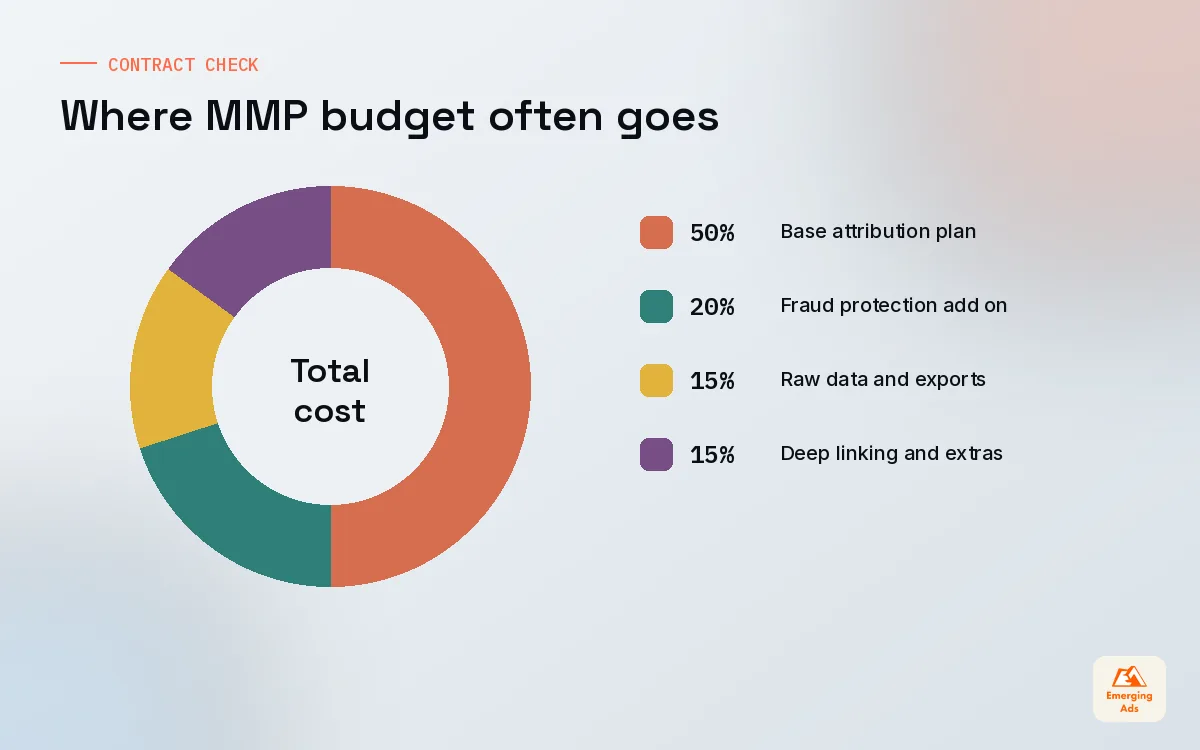
- Add ons for fraud protection, raw data, cost aggregation or deep linking can double the real price. Ask for the total, not the headline.
- Auto renewals with long notice periods are the trap we see most. Diarise the notice date the day you sign.
Before signing, run a two to four week trial with the SDK installed in a test build and at least one real campaign connected. Check that events arrive, postbacks reach the networks and the numbers roughly agree with the store consoles. A small gap is normal. A large unexplained gap means a setup problem you want to find before the contract, not after.
If you are still deciding how to split budget across channels, our guide to app user acquisition covers the channel mix and testing stages that sit on top of this measurement layer. And you will find the rest of our app growth notes on the youremergingads.com homepage.
Frequently asked questions
Straight answers to what clients ask us most about mobile measurement partner.
What is a mobile measurement partner?
Do I need an MMP if I only run one channel?
How is an MMP different from Mixpanel or Firebase?
Which MMP is best for a subscription app?
How does iOS attribution work after App Tracking Transparency?
How many in-app events should we track in the MMP?
Why do my MMP numbers not match Meta or Google?
What is a deferred deep link?
How do MMPs detect ad fraud?
How much does a mobile measurement partner cost?
Can we switch MMPs later?
Not sure your MMP numbers can be trusted?
We will audit your SDK events, network connections and attribution settings, then show you exactly where the data drifts. You get a plain fix list, not a sales deck.
Book your free audit