App User Acquisition in 2026: The Complete Guide to Users Who Stay
App user acquisition is not about buying installs. It is about buying the people who are still opening your app on Day 30, at a price your business can carry. This is the system we run on live accounts.
Key takeaways
- App user acquisition works as a system: channel mix, testing budget, creative supply, measurement and scaling rules all depend on each other.
- Judge channels on cost per retained user and payback, never on cost per install alone. Cheap installs that churn by Day 7 are the most expensive kind.
- Match the channel mix to the app type. A subscription fitness app, a casual game and a fintech app should not share a media plan.
- Creative is the main lever left after ATT. Plan for a steady supply of new concepts every week, not a big batch every quarter.
- Run a staged 90-day plan: prove one channel, find a repeatable creative angle, then scale with clear rules for when to push and when to stop.
01What app user acquisition really means in 2026
When a founder asks us to take over their app user acquisition, the first thing we ask for is not the ad account. It is the retention table. Nine times out of ten, the install numbers look healthy and the Day-30 numbers tell a very different story. That gap is where most UA budgets disappear.
Here is the definition we work to: app user acquisition is the repeatable process of finding people who will get lasting value from your app, and bringing them in at a cost that pays back inside a time window your cash flow can survive. Installs are a step along the way. They are not the goal.
That shift sounds small, but it changes almost every decision. It changes which channels you test first, how you brief creative, what events you send back to the ad platforms, and when you are allowed to raise budgets. Teams that optimise for installs usually end up with a cheap, noisy audience. Teams that optimise for retained, paying users build something that compounds.
Why the old playbook stopped working
Apple’s App Tracking Transparency arrived with iOS 14.5 in April 2021, and apps now have to ask permission before tracking people across other companies’ apps and sites. Access to the IDFA dropped sharply as a result, and with it the precise targeting and attribution that early mobile growth relied on. The platforms adapted with broader, more automated campaigns. That means the advertiser’s edge moved away from audience hacks and towards three things you still control: your creative, your conversion events, and the quality of your product’s first session.
02Cost per install vs cost per retained user
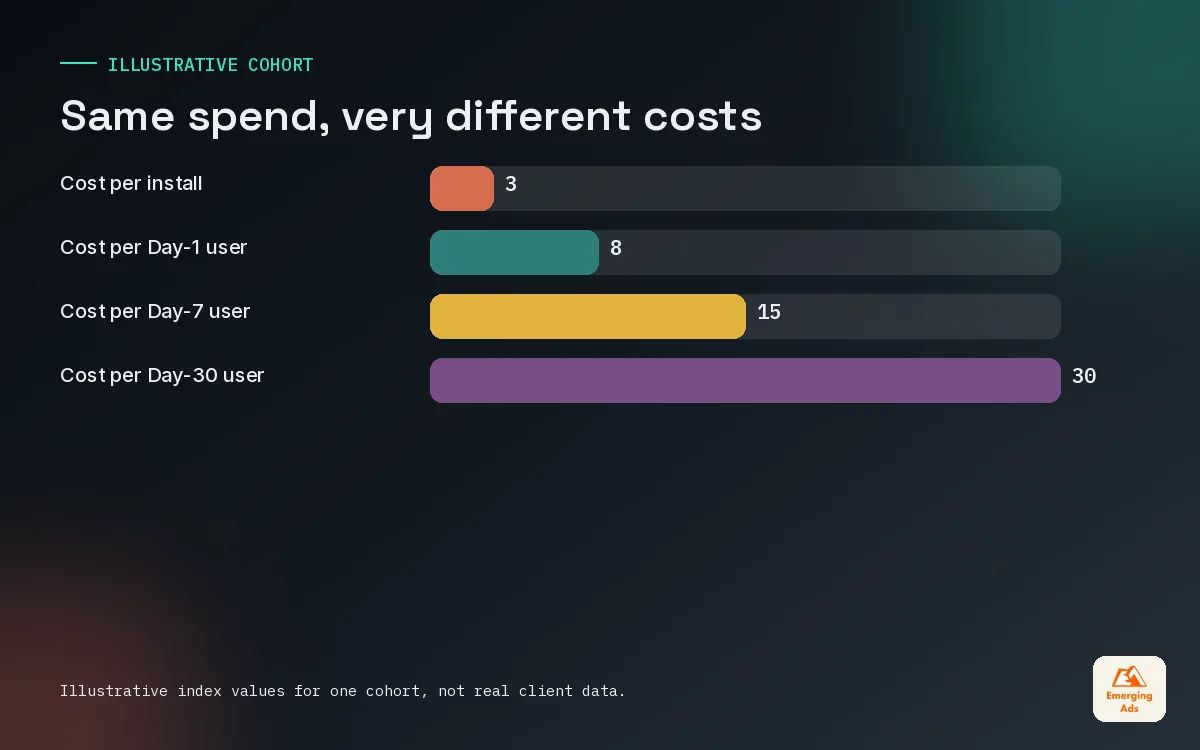
Cost per install (CPI) is the number every dashboard shows first, so it is the number everyone argues about. It is also the least useful number in isolation. A channel that delivers installs at half the price is a bad deal if those users leave twice as fast.
On accounts we manage, we replace CPI as the headline metric with cost per retained user: spend divided by the number of users still active at a chosen day, usually Day 7 for early reads and Day 30 for budget decisions. Pair it with ROAS and payback period once revenue data is flowing, and you have a far clearer picture.
| Metric | What it tells you | Where it misleads |
|---|---|---|
| CPI | How cheaply a channel produces installs | Ignores quality, rewards low intent placements |
| Day 1 retention | Whether the first session lands | Too early to judge long term value |
| Cost per Day-7 user | Early signal of audience quality | Can flatter apps with a strong first week only |
| Cost per Day-30 user | Whether the channel finds real users | Slow, needs a month of patience |
| Payback period | How long until spend comes back as revenue | Needs reliable revenue tracking per cohort |
A simple example from a subscription app we picked up last year: one network delivered installs at a much lower CPI than Meta, and the previous team had shifted half the budget towards it. When we lined both channels up by cost per Day-30 user, Meta was clearly cheaper. The cheaper installs were mostly people who opened once and never came back.
03Choosing your app user acquisition channels by app type
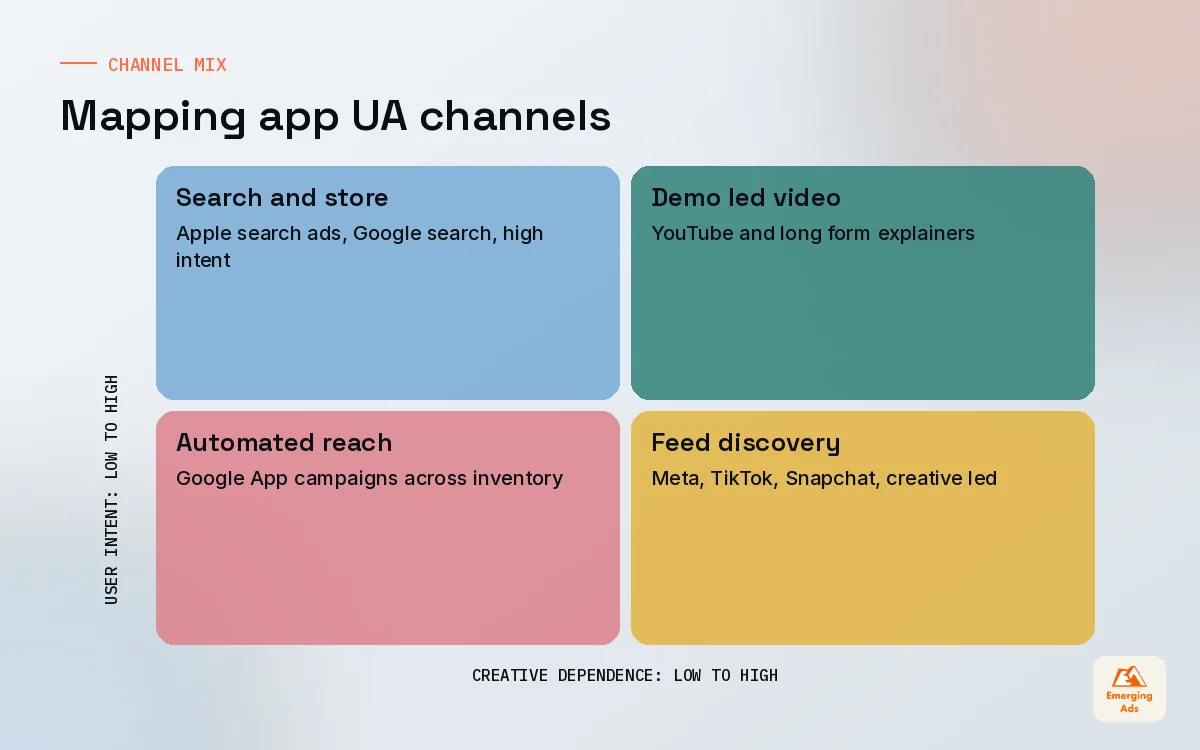
There is no universal channel mix. The right one depends on how your app makes money, how people search for it, and how visual the product is. The main paid channels for most apps are Meta, Google, TikTok, Snapchat and Apple’s App Store search ads, and each behaves differently depending on what you sell.
| App type | Where we usually start | Why |
|---|---|---|
| Subscription (fitness, wellness, learning) | Meta and TikTok, then Apple search ads | Visual transformation stories, strong intent on brand and category searches |
| Casual and mid-core games | Google App campaigns, TikTok, Meta | Gameplay video sells itself and volume matters |
| Fintech | Google, Apple search ads, Meta | High intent searches and trust building creative |
| Ecommerce and marketplaces | Meta, Google, retargeting | Catalogue and offer driven, repeat purchase economics |
| On-demand services | Google and Meta with local focus | Need in specific service areas, fast first order |
| Edtech | YouTube, Meta, TikTok | Longer consideration, demo style content works |
For most clients we start on two channels, not five. Usually one is a broad, creative-led channel such as Meta app campaigns and the other is an intent-led channel such as Google or Apple search ads. Spreading a small budget across every platform means none of them gets enough conversion data to learn.
Where each channel earns its place
- Meta. Still the most dependable scaling channel for many app categories, provided you feed it strong creative and a meaningful in-app event.
- Google. App campaigns run automatically across Search, Google Play, YouTube, Discover and the Display Network from the text, image and video assets you supply. Our Google Ads team treats asset quality as the main input.
- TikTok. Excellent for apps with a visible before and after, or a product people enjoy showing off. Our TikTok advertising service leans heavily on native-looking creator content.
- YouTube. Useful for apps that need explaining, especially edtech, finance and productivity. Longer formats on YouTube ads can carry a full demo.
- Apple search ads. Captures people already searching the App Store. Usually the cleanest intent you can buy on iOS.
04Budgets and testing stages that protect your cash
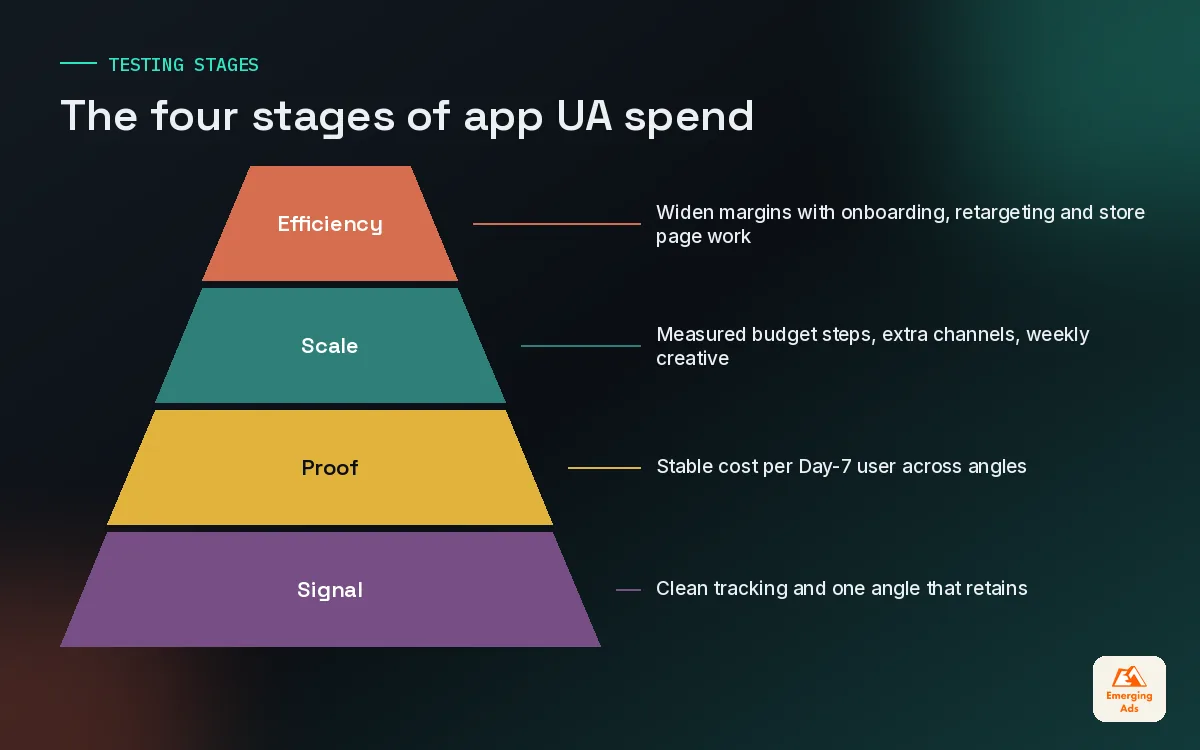
The biggest budget mistake we see is scaling before the basics are proven. A founder raises a round, doubles spend overnight, and watches cost per retained user climb while nobody can say why. We break app user acquisition into stages, and each stage has a job and an exit condition.
Stage 1: Signal
Small, controlled spend on one or two channels. The goal is to confirm tracking works end to end, that your chosen optimisation event fires reliably, and that at least one creative angle produces users who come back. We do not judge ROAS here. We judge whether the data is trustworthy.
Stage 2: Proof
Enough spend for the platform to exit its learning phase and stabilise. Here we compare cost per Day-7 user across angles and audiences, and start building an early payback estimate per cohort. Our setup work on app install campaigns is mostly about getting this stage right.
Stage 3: Scale
Budget increases in measured steps, a second and third channel added, and creative production moved to a weekly rhythm. This is where most of the money is spent, and where discipline matters most.
Stage 4: Efficiency
Once scale is stable, the work shifts to margins: better onboarding, smarter retargeting, store page conversion, and pruning the placements that never paid back.
| Stage | Main question | Move on when |
|---|---|---|
| Signal | Is the data clean and is anyone retaining? | Events match backend numbers and one angle retains |
| Proof | Can we buy retained users at a sustainable cost? | Cost per Day-7 user is stable for two to three weeks |
| Scale | How far can spend grow before efficiency drops? | Marginal cost per retained user hits your ceiling |
| Efficiency | Where can we widen the margin? | Ongoing, reviewed monthly |
05Creative supply is the engine of app user acquisition
With targeting largely automated, creative now does most of the targeting for you. The hook, the face on screen, the problem you name in the first line: these decide who stops scrolling, and the algorithm learns from who stops. That makes creative the single biggest lever in modern mobile UA.
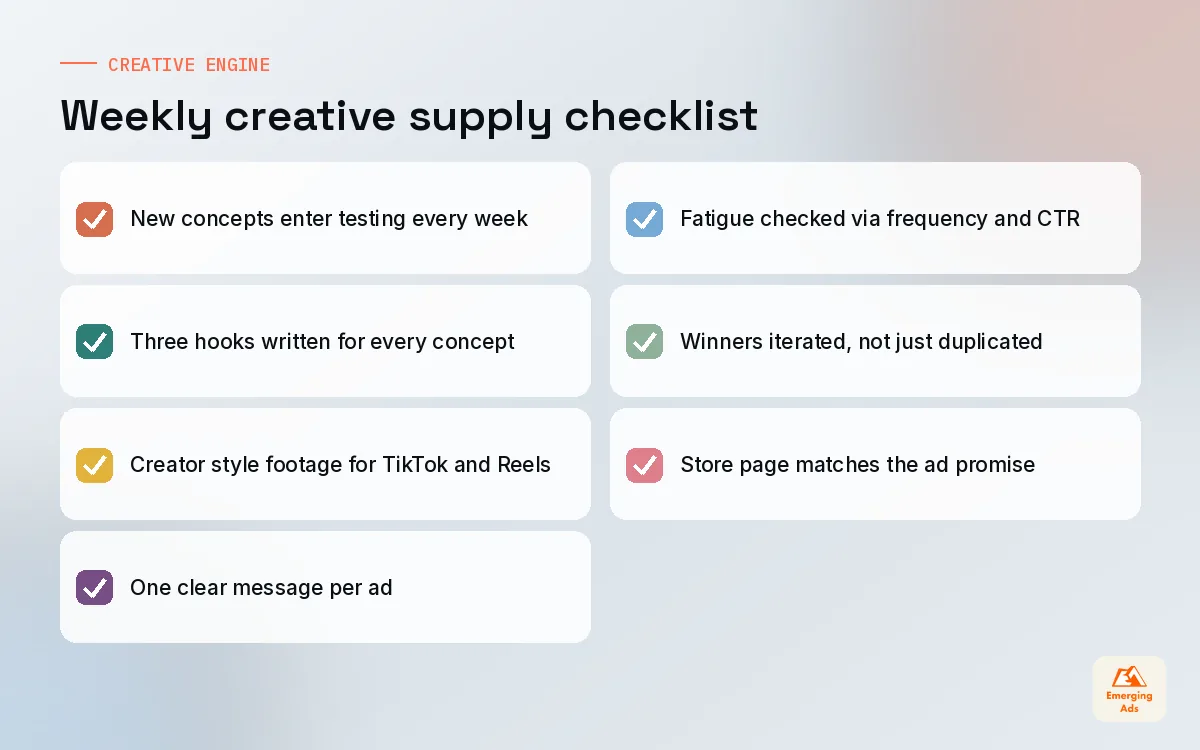
The practical problem is volume. Winning ads fatigue, often within a few weeks on high-spend accounts. If your team produces a big batch of creative once a quarter, you will spend most of that quarter running tired ads. We plan for a steady supply instead, with new concepts entering testing every week.
- Concepts before variations. Test genuinely different ideas first: a problem and solution story, a feature demo, a creator testimonial, a gameplay clip. Variations of a single idea come later.
- Hooks in the first seconds. Most of the result is decided before the logo appears. Write three hooks for every concept.
- Native over polished. On TikTok and Reels, creator-style footage usually beats studio work. Our video content production team shoots both, but briefs them differently.
- One message per ad. An ad that tries to show every feature usually sells none of them.
The ad account learns from your creative. If every ad looks the same, it can only find one kind of user.
06Measurement that supports decisions after ATT
You cannot run app user acquisition well on platform dashboards alone. Each network reports its own version of events, and on iOS those numbers rely on modelled or privacy-limited data. A mobile measurement partner such as AppsFlyer, Adjust, Branch or Singular gives you one neutral view across channels, and product analytics in Mixpanel, Amplitude or Firebase show what users do after the install.
On iOS, SKAdNetwork is Apple’s privacy-preserving install attribution framework, and Apple introduced AdAttributionKit in 2024 to work alongside it. On Android, the Google Play Install Referrer API supports attribution. We will cover these in depth in separate guides, but for UA planning the key point is this: decide your conversion events before you spend, and make sure they reflect value, not just activity.
The events we usually send back to platforms
- Install and first open, for basic delivery.
- A clear activation event, such as completing onboarding or a first workout or first lesson.
- Trial start or first purchase, depending on the model.
- Subscription conversion or repeat purchase, where volume allows.
When the numbers from your MMP, your analytics and your backend disagree, trust the backend for revenue and use the others for direction. Our attribution modelling work exists largely to reconcile those views into something a finance team will accept.
07Scaling rules: when to push and when to stop
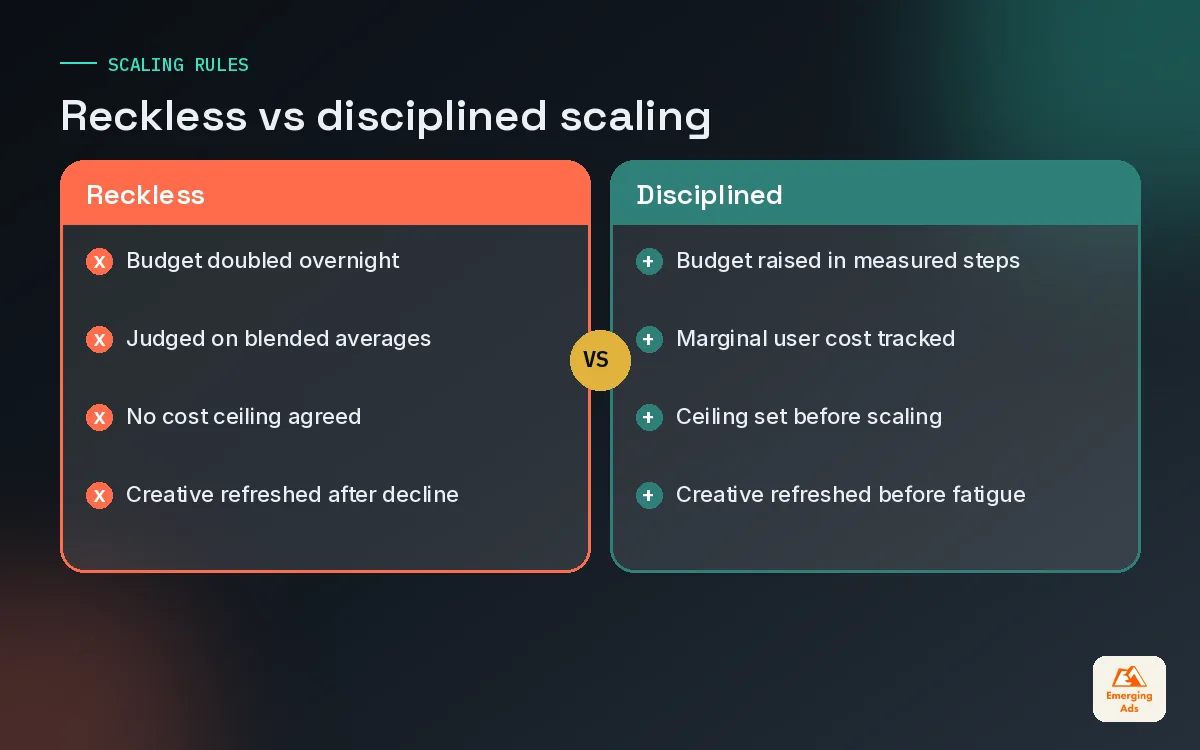
Scaling is where we see the most expensive mistakes, because the damage is hidden for weeks. Spend goes up, installs go up, everyone is happy, and then the Day-30 cohort lands and the payback period has quietly doubled. A few simple rules prevent most of this.
- Raise budgets in steps, not leaps. Large overnight jumps often push campaigns back into learning and distort results.
- Watch the marginal user, not the average. Your blended cost per retained user can look fine while the last tranche of spend is buying very poor users.
- Set a ceiling before you start. Agree the maximum cost per retained user or the longest acceptable payback period in advance, so nobody negotiates with themselves mid-scale.
- Refresh creative before you need it. When frequency rises and click-through falls together, fatigue has already started.
- Pause without drama. If a channel misses the ceiling for three consecutive cohorts, cut it back and move the budget.
08How organic and paid acquisition feed each other
Paid and organic are often reported as separate worlds, but they behave like one system. Paid campaigns lift your download velocity and brand searches, which can help store rankings. A stronger store page then converts paid traffic better, which lowers your cost per install across every channel.
That is why we rarely run paid UA without looking at the store listing. Clear screenshots, a sharp subtitle and solid ratings make every paid click cheaper. Our app store optimisation work and our media buying share the same weekly review for this reason. Apple’s custom product pages also let you create additional versions of the product page for different ads, so the page a TikTok viewer lands on can match the ad they just saw.
The other half of the loop is lapsed users. Some of your cheapest growth comes from people who already installed and drifted away. Targeted app retargeting campaigns bring them back, often at a fraction of the cost of finding someone new, provided you have something genuinely new to show them.
09A 90-day app user acquisition plan
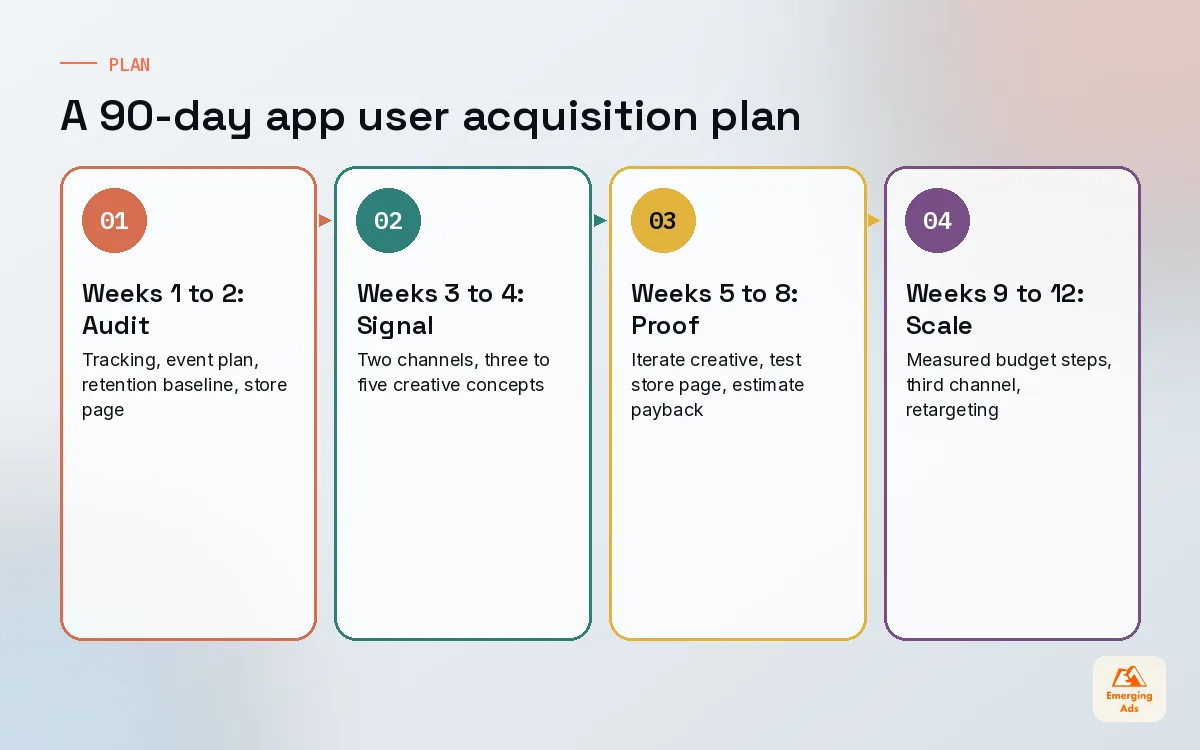
This is the plan we use when a new client comes to us with a live app and modest budget. It is deliberately conservative in the first month, because the first month is about trustworthy data, not growth.
| Weeks | Focus | Output |
|---|---|---|
| 1 to 2 | Tracking audit, event plan, retention baseline, store page review | Clean data and a defined retained user |
| 3 to 4 | Signal stage on two channels, three to five creative concepts | First read on cost per Day-7 user |
| 5 to 8 | Proof stage, creative iteration, store page tests | Stable angle, early payback estimate |
| 9 to 12 | Measured scaling, third channel test, retargeting launch | Scaling ceiling and a quarterly budget plan |
The plan bends to the app. A game might move faster through the early stages because events fire within minutes. A fintech app with a slow approval process might need longer before anyone can judge quality. What does not change is the order: data, then proof, then scale.
If you want to see what this looks like across all our disciplines, the full list of EmergingAds services shows how UA, creative, analytics and lifecycle work connect. For a sense of what budgets look like in practice, the main site also covers what app install campaigns cost. And you can find the rest of our app growth thinking on the youremergingads.com homepage.
Frequently asked questions
Straight answers to what clients ask us most about app user acquisition.
What is app user acquisition?
Which channels work best for app user acquisition?
How much should I spend on app user acquisition at the start?
Is cost per install still a useful metric?
What is a good Day-30 retention rate?
How did ATT change app user acquisition?
How often should we refresh app ad creative?
Do I need a mobile measurement partner for UA?
Should app user acquisition include organic work?
When is the right time to scale app user acquisition?
Can a small team run app user acquisition in-house?
Are your installs turning into users who actually pay?
We will review your channel mix, creative pipeline and cohort data side by side and show you where the spend leaks. You get a clear list of fixes, not a sales deck.
Book your free audit